

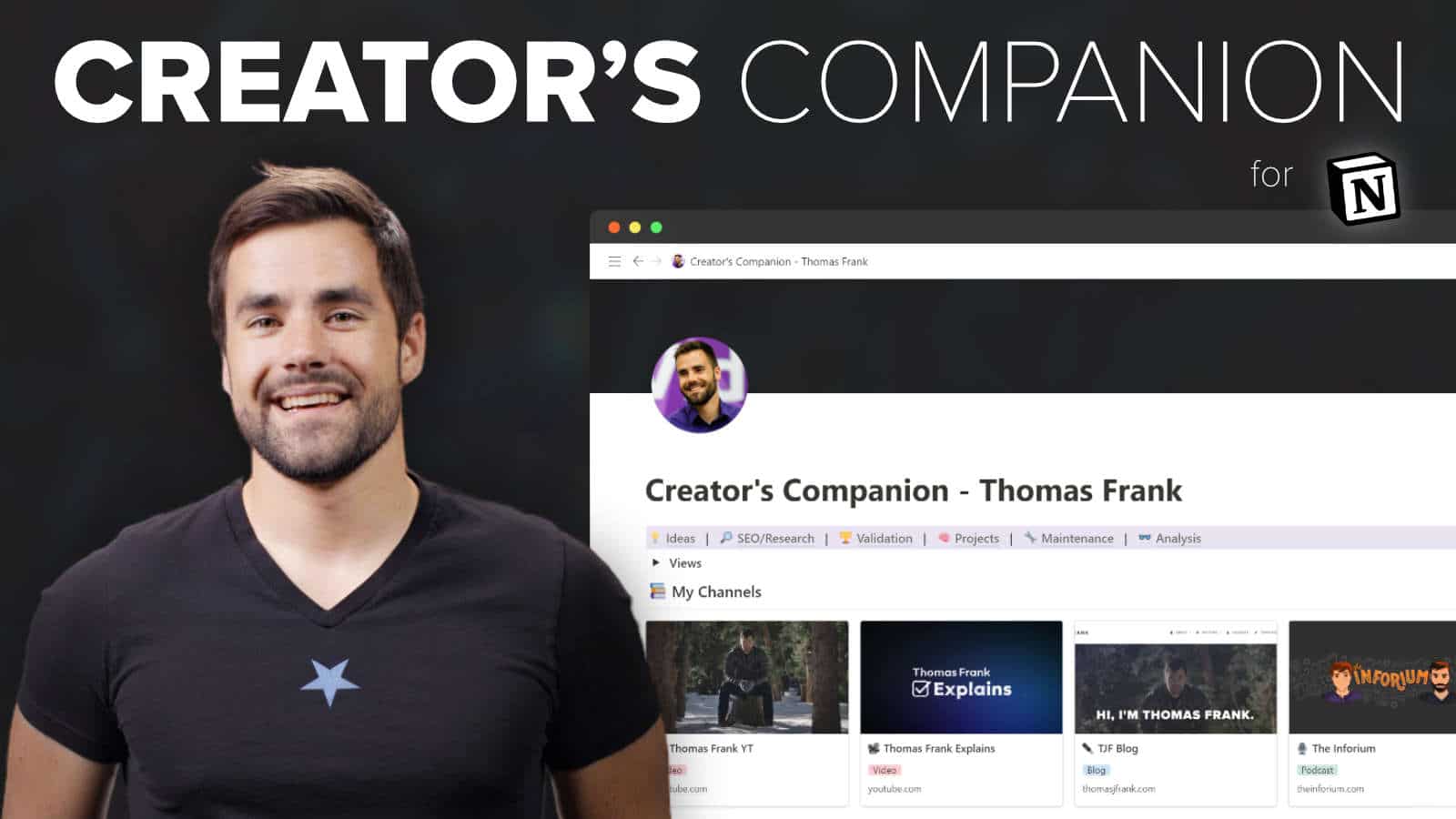
What is Thomas Frank Creator’s Companion (Ultimate Brain Edition) for Cheap?
The Ultimate Brain edition of Creator’s Companion comes bundled with the popular Ultimate Brain template – my all-in-one second brain system for Notion.
Ultimate Brain lets you seamlessly manage tasks, notes, projects, and goals in Notion – and includes both GTD® lists and P.A.R.A. organization, a la Tiago Forte’s Building a Second Brain.
The bundle comes with a fully integrated version of both of both templates – meaning you’ll see all the notes and tasks you add to your content projects inside Ultimate Brain’s dedicated Note and Task dashboards.
What You’ll Learn In Creator’s Companion (Ultimate Brain Edition)?
- Deep integration with the Ultimate Brain template – a full second brain for Notion
- Add tasks, sub-tasks, AND notes to any content project
- Track everything in your life – tasks, notes, projects, and goals
- GTD®-style processing dashboard
- P.A.R.A. organization dashboard
- Tutorials and Documentation
Thomas Frank Creator’s Companion (Ultimate Brain Edition) Index:
📂 01-Ultimate Brain
- 📄 00-How to move from Ultimate Tasks to Ultimate Brain.mkv (74.52 MB)
- 📂 00-Getting Started
- 📄 01-Getting Started.pdf (443.59 KB)
- 📄 02-Changing settings or database templates.pdf (101.64 KB)
- 📄 03-Ultimate Brain Demo.pdf (89.53 KB)
- 📂 01-Beginner’s Guide
- 📄 00-A Note on Learning.pdf (132.02 KB)
- 📄 01-Full Ultimate Brain Overview.mkv (155.56 MB)
- 📄 02-Day-to-Day Use Guide.mkv (106.73 MB)
- 📄 03-Quickly Capture Anything.mkv (8.76 MB)
- 📄 04-Manage All Your Tasks.mkv (25.04 MB)
- 📄 05-Resource.pdf (91.56 KB)
- 📄 05-Set Recurring Tasks.mkv (23.67 MB)
- 📄 06-Automating Recurring Tasks with Automate.io.mkv (40.56 MB)
- 📄 07-Automating Recurring Tasks with Automate.io.mkv (43.69 MB)
- 📄 08-Create and Manage Projects.mkv (26.13 MB)
- 📄 09-Creating a New Project 1.pdf (82.85 KB)
- 📄 10-Creating a New Project 2.pdf (73.77 KB)
- 📄 11-Applying the Project Template.pdf (69.35 KB)
- 📄 12-Add Tasks and Notes to Your Project.pdf (66.94 KB)
- 📄 12-View All Your Notes.mkv (42.29 MB)
- 📄 13a-Note Inbox.pdf (60.30 KB)
- 📄 13b-Note Inbox.pdf (44.33 KB)
- 📄 14a-Favorites.pdf (73.95 KB)
- 📄 14b-Favorites.pdf (39.19 KB)
- 📄 15-Recents.pdf (82.64 KB)
- 📄 16-Areas and Resources.pdf (71.79 KB)
- 📄 17-Daily Journal.mkv (19.34 MB)
- 📄 18-Creating a New Daily Note.pdf (68.97 KB)
- 📄 19-Organize Your Life with Areas.mkv (51.04 MB)
- 📄 19-Organize Your Life with Areas.pdf (98.92 KB)
- 📄 20a-Area Example Screenshot.pdf (76.13 KB)
- 📄 20b-Area Example Screenshot.png (1.92 MB)
- 📄 21a-Can Areas contain task.pdf (59.66 KB)
- 📄 21b-Can Areas contain task.pdf (85.62 KB)
- 📄 22-P.A.R.A. in Ultimate Brain.pdf (60.41 KB)
- 📄 23-Sample Areas.pdf (72.15 KB)
- 📄 24-How to Create Your First Area.pdf (52.12 KB)
- 📄 25-Organize Your Interests with Resources.mkv (51.04 MB)
- 📄 25-Organize Your Interests with Resources.pdf (45.26 KB)
- 📄 26a-Resource Example Screenshot.pdf (122.68 KB)
- 📄 26b-Resource Example Screenshot.png (351.94 KB)
- 📄 27a-Sample Resources.pdf (44.79 KB)
- 📄 27b-Sample Resources.pdf (48.51 KB)
- 📄 28-How to Create a Resource.pdf (53.11 KB)
- 📄 29-Setting a Root Area.pdf (113.58 KB)
- 📄 30-Set and Track Your Goals.mkv (20.66 MB)
- 📄 30-Set and Track Your Goals.pdf (55.23 KB)
- 📄 31-Goals by Area.pdf (44.74 KB)
- 📄 32-How to Create Your First Goal.pdf (64.33 KB)
- 📄 33a-Example – Goal with Milestones.pdf (59.45 KB)
- 📄 33b-Example – Goal with Milestones.png (339.41 KB)
- 📄 34a-Example – Project Inside a Goal.pdf (85.33 KB)
- 📄 34b-Example – Project Inside a Goal.png (993.70 KB)
- 📄 35-Plan Your Day.mkv (30.96 MB)
- 📄 36a-Synced Blocks.pdf (100.63 KB)
- 📄 36b-Synced Blocks.mkv (11.63 MB)
- 📄 36c-Synced Blocks.pdf (83.32 KB)
- 📄 37-Upcoming Tasks.pdf (68.40 KB)
- 📄 38-Daily Journal and Priority Projects.pdf (84.26 KB)
- 📄 39a-Plan Your Future.mkv (17.73 MB)
- 📄 39b-Plan Your Future.pdf (89.00 KB)
- 📄 39c-Plan Your Future.pdf (54.29 KB)
- 📄 40-Access Everything on the Dashboard.mkv (20.41 MB)
- 📄 41-How to Add a Page to Favorites.pdf (93.76 KB)
- 📄 42-Archive – Keep Your Space Clean.mkv (20.03 MB)
- 📄 42-Archive – Keep Your Space Clean.pdf (87.11 KB)
- 📄 42-Dashboard.pdf (81.01 KB)
- 📄 43-Archived Notes.pdf (71.11 KB)
- 📄 44-How to Archive a Note.pdf (40.27 KB)
- 📄 45-Archived Goals, Projects, Areas, Resources.pdf (68.76 KB)
- 📄 46-Old Fleeting Notes.pdf (54.71 KB)
- 📄 47-Completed Tasks.pdf (92.55 KB)
- 📂 02-Special Features
- 📄 01-GTD Workflow with the Process Page.mkv (62.49 MB)
- 📄 01-GTD Workflow with the Process Page.pdf (55.79 KB)
- 📄 02-Learn How GTD Works in This 12-Minute Video.mkv (76.15 MB)
- 📄 03a-GTD Workflow with the Process Page.pdf (58.81 KB)
- 📄 03b-GTD algorithm.pdf (48.30 KB)
- 📄 03b-GTD algorithm.txt (57.00 B)
- 📄 04a-Task Processing.pdf (91.35 KB)
- 📄 04b-What’s the difference between Task Inbox and Intake.mkv (20.84 MB)
- 📄 05-Task Processing.pdf (75.78 KB)
- 📄 06-Dedicated GTD-Style Pages.pdf (71.02 KB)
- 📄 07-Do Next.pdf (68.97 KB)
- 📄 08-Note Processing.pdf (49.36 KB)
- 📄 09-The Book Tracker.mkv (11.87 MB)
- 📄 09-The Book Tracker.pdf (55.93 KB)
- 📄 10-Set Book-Specific Properties.pdf (84.40 KB)
- 📄 11-The Recipe Book.mkv (16.92 MB)
- 📄 11-The Recipe Book.pdf (165.14 KB)
- 📄 12-Add a New Recipe.pdf (57.62 KB)
- 📄 13-Set Recipe Tags.pdf (76.13 KB)
- 📄 14-Fleeting Notes.mkv (6.61 MB)
- 📄 14-Fleeting Notes.pdf (58.95 KB)
- 📄 15-Cold Tasks.mkv (16.72 MB)
- 📄 15-Cold Tasks.pdf (104.15 KB)
- 📄 16a-How to Change or Disable Cold Tasks.pdf (110.95 KB)
- 📄 16b-How to Change or Disable Cold Tasks.pdf (91.96 KB)
- 📄 16c-How to Change or Disable Cold Tasks.pdf (59.42 KB)
- 📄 17-Check it Out.pdf (48.07 KB)
- 📄 18a-Pulled Notes and Resources.mkv (23.91 MB)
- 📄 18a-Pulled Notes and Resources.pdf (83.41 KB)
- 📄 18b-Pulled Notes and Resources.pdf (79.05 KB)
- 📄 19-Quick Links.mkv (6.02 MB)
- 📄 19-Quick Links.pdf (97.07 KB)
- 📄 20-Learn more about linking pages in Notion.mkv (49.95 MB)
- 📄 20-Learn more about linking pages in Notion.pdf (136.12 KB)
- 📄 21-Page Links.pdf (86.38 KB)
- 📄 22-How to Add a Page to Favorites.pdf (97.42 KB)
- 📂 03-Modify Ultimate Brain
- 📄 01-Create New Special Note Pages.mkv (65.60 MB)
- 📄 01-Create New Special Note Pages.pdf (132.66 KB)
- 📄 02-Integrating New Databases into Ultimate Brain.mkv (72.05 MB)
- 📄 02-Integrating New Databases into Ultimate Brain.pdf (133.14 KB)
📂 02-Creator’s Companion
- 📄 01a-Start Here – Full Tour of Creator’s Companion.pdf (487.41 KB)
- 📄 01b-Full Tour of Creator’s Companion (Beta).mkv (67.09 MB)
- 📄 01c-Taking a Project from Start to Finish (Comprehensive).mkv (96.73 MB)
- 📄 01d-Starting a Content Project (The Quick Way).mkv (11.43 MB)
- 📄 02-Important Note.png (15.81 KB)
- 📄 02a-Setting Up Your Channels.mp4 (55.28 MB)
- 📄 02b-New Grouping Feature.mp4 (65.63 MB)
- 📂 Creator’s Companion
- 📄 00-Creator’s Companion [Base Version].txt (97.00 B)
- 📄 00-Creator’s Companion [Ultimate Tasks Version].txt (107.00 B)
- 📄 00-Reference – The Knowledgebase.mkv (34.00 MB)
- 📄 01-Reference – Content Ideas View.mkv (28.01 MB)
- 📄 02-Reference – SEO or Research View.mkv (38.96 MB)
- 📄 03-Reference – Validation View.mkv (27.48 MB)
- 📄 04-Reference – Project Management View.mkv (22.89 MB)
- 📄 05-Reference – Maintenance View.mkv (17.77 MB)
- 📄 06-Reference – Analysis View.mkv (12.65 MB)
- 📄 07-Ultimate Tasks in Creator’s Companion.mkv (49.92 MB)
- 📄 08-How to Create New Templates (for Different Kinds of Content).mp4 (77.94 MB)
📂 03-CC Ultimate Tasks
- 📄 01a-How to Integrate Your Own Ultimate Tasks Copy into Creator’s Companion.pdf (206.97 KB)
- 📄 01b-How to Integrate Your Own Ultimate Tasks Copy into Creator’s Companion.mp4 (561.77 MB)
- 📄 02a-How to Integrate a New Copy of Ultimate Tasks into Creator’s Companion.pdf (141.77 KB)
- 📄 02b-How to Integrate a New Copy of Ultimate Tasks into Creator’s Companion.mp4 (606.26 MB)
📂 04-CC + Ultimate Brain
- 📄 01a-Template Link + Getting Started Guide!.pdf (435.31 KB)
- 📄 01b-Template Overview.mp4 (263.13 MB)
- 📄 02-Info on Transferring Content.pdf (351.22 KB)
💬 Feel free to REACH OUT to our CHAT support for personalized assistance and detailed information tailored to your needs. We’re here to help!





Reviews
There are no reviews yet.