Eva Glasbeek Video Campaign Formula is reviewed here from the supplied 2026 course index and lesson transcripts, not from promotional assumptions.
This review explains what the course actually teaches, who it is built for, where its strongest practical value sits, and the complete indexed video structure.
Browse Courses On Budget, the
Design Courses category, or the
Design Courses Cheap catalog.
Updated September 13, 2026 · Permanent review URL:
https://coursesonbudget.com/eva-glasbeek-video-campaign-formula-index-review-2026/
| Review criterion | Verified detail |
|---|---|
| Indexed videos | 38 videos |
| Verified runtime | 5 hours 58 minutes 28 seconds |
| Indexed files | 50 files |
| Indexed size | approximately 2.39 GB |
| Main structure | 7 modules |
| Core workflow | Concept → structured shooting → camera settings → movement → directing → lighting → editing |
| Named editing software | Adobe Premiere Pro |
| Product page | Video Campaign Formula |
Eva Glasbeek Video Campaign Formula Review: What the Course Actually Teaches
The strongest feature of this curriculum is sequence. The lessons do not begin with a random camera trick. They begin with intention: what the video is supposed to make the viewer feel, what the brand or creator wants to communicate, and how that intention becomes a concept, a shot plan, a shoot and finally an edit. In the Storytelling 101 lesson, Glasbeek explicitly distinguishes fast visual storytelling from traditional narrative filmmaking. The emphasis is on rhythm, contrast, repetition, composition, color and symbolism rather than on building a long plot.
That distinction matters for social campaigns. The transcript explains that a short campaign still needs a beginning, middle and end, but the opening must establish context quickly and function as a hook. The course then turns that creative principle into production decisions: shot scale, camera movement, focal length, continuity, lighting and pacing. The result is a curriculum that repeatedly connects creative intent to technical execution rather than teaching each camera setting in isolation.
The supplied index also shows why this is broader than a beginner camera course. It includes concept development, moodboarding, location preparation, gear choices, focal length, two repeatable shooting frameworks, picture profiles, LUTs, frame rates, stabilizer and handheld techniques, directing talent, team dynamics, natural and studio lighting, footage backup, Premiere Pro, export settings and color grading. That breadth is the main reason the course works as a campaign workflow rather than a collection of tips.
From Concept to Moodboard: The Creative Foundation
Module 1 gives the course its strategic backbone. In the concept lesson, Glasbeek describes four stages: understand the brand and audience, define the video objective, brainstorm directions and then develop the concept. She also separates personal portfolio work from client work. For client projects, the transcript includes a practical set of questions around audience, platform, duration, goal, brand identity and reference videos. That is useful because it turns the vague instruction “make something cool” into information that can actually guide a shoot.
The course also uses AI as a brainstorming aid, but the framing is cautious rather than automatic. Glasbeek describes ChatGPT as a rough sketch or blueprint, not the finished creative product. The point is to use it to generate directions, sequences or technical ideas and then rewrite and shape the concept with human judgment. That is a more defensible workflow than outsourcing the creative decision itself.
Moodboarding then converts the idea into something a client, model or team can understand. The transcript describes gathering roughly 10–15 visual references, identifying essential shots, and organizing the result by sequence with notes for movement, lens choice and frame rate. The accompanying location-recce bonus extends that preparation into lighting conditions, logistics, permissions, framing tests and lens-angle checks. Together, those lessons make pre-production concrete.
The 7-Step and 3-Point Methods: Why the Shooting Section Is the Core
The most reusable material appears in Module 2. Glasbeek’s 7-step method is designed as a fallback structure when a shoot becomes uncertain. The seven elements are wide shots, close-ups, moving shots, static shots, medium shots, transition shots and B-roll. Each has a role: establish place, show detail or emotion, create pace, provide visual rest, preserve context, connect edits and build atmosphere. The value is not that these shot types are unknown; it is that the course organizes them into a checklist that can be applied repeatedly.
The 3-point method adds another layer: capture the same action from three different perspectives, distances or movement styles. In the lesson transcript, a simple action such as crossing a bridge or drinking a matcha is repeated in wide, closer and detail-oriented variations. That gives the editor enough coverage to turn a small action into a sequence. For creators who often return from a shoot with attractive but disconnected clips, this is one of the clearest practical ideas in the course.
Focal length is treated as a storytelling decision rather than only a technical number. Wide, standard and telephoto perspectives are connected to context, intimacy, distortion and background compression. The gear lesson makes a similar point: handheld, stabilizer, camcorder, film camera and still-photo bursts create different textures. Glasbeek also argues for a compact setup and explains why she prefers equipment that lets her move quickly rather than carrying a heavier rig simply because it appears more “cinematic.”
Camera Settings, Movement, Lighting and Premiere Pro Workflow
Modules 3 through 7 convert the creative framework into execution. Camera settings cover the exposure triangle, focus settings, picture profiles, camera setup, LUTs and frame rates. The movement section then separates grip choices, stabilizer work, top-handle/cage use, strap work and in-camera transitions. Those lessons are followed by directing talent and managing team dynamics on set, which is important because a technically correct shot still depends on communicating with the people being filmed.
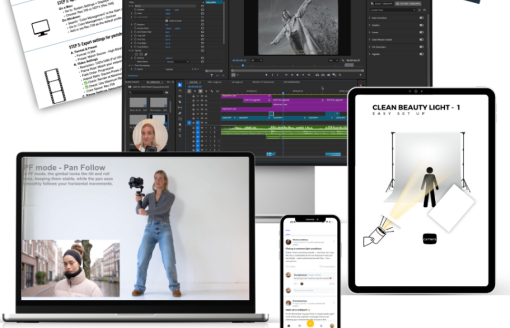
Lighting is kept structurally simple: natural light, four studio-light setups, and a comparison between DIY lighting and working with a professional. Post-production is much larger. The final module covers backup and footage selection, a wedding-film example, Premiere Pro, import/edit workflow, horizontal-to-vertical conversion, export/color settings and color grading/matching. The indexed support files also include PDFs, a camera-settings checklist, an export-settings playbook and CUBE LUT files.
That progression is why the course is strongest as an end-to-end system. It does not end when the footage is captured. The editing section is long enough to show that organization, delivery format and color are treated as part of the production decision. If your goal is only advanced color science or only advanced lighting, a specialist course would go deeper. If your goal is to connect planning, shooting and editing into a repeatable campaign process, the structure here is unusually coherent.
Full Video Index: Every Indexed Lesson
The complete video index below is reconstructed from the supplied transcript package. Durations are included because every Eva Glasbeek video transcript contains duration metadata. Supporting PDFs, images and CUBE files exist in the broader file index, but this accordion deliberately lists every indexed video lesson as requested.
MODULE 1 – BUILT YOUR CONCEPT — 4 videos
- 1.1 STORYTELLING 101 (13m 37s)
- 1.2 THE CONCEPT coming up with ideas (17m 27s)
- 1.3 MOODBOARDING visualising your ideas (7m 50s)
- BONUS – Location checkrecce (5m 17s)
MODULE 2 – SHOOT WITH STRUCTURE — 8 videos
- 2.1 CHOOSE YOUR WEAPON whats in my bag (11m 53s)
- 2.2 PICK YOUR FOCAL LENGTH it changes more than you think (6m 14s)
- 2.3 MY 7-STEP METHOD the shots that will save EVERY video (5m 43s)
- 2.4 THE 3-POINT METHOD the method that brings every sequence to life (13m 56s)
- 2.5 CONTINUITY make it make sense (3m 50s)
- 2.6 CREATIVE TOOLS cheap and easy (2m 22s)
- 2.7 ALL OF THE METHODS IN ACTION read description (0m 53s)
- BONUS MENTAL PREPARATION (3m 59s)
MODULE 3 – CAMERA SETTINGS MADE SIMPLE — 7 videos
- 3.1 EXPOSURE TRIANGLE a quick refresher (5m 14s)
- 3.2 FOCUS SETTINGS the settings you need to follow your subject (5m 48s)
- 3.3 PICTURE PROFILES log cine4 explained ️ read description (5m 58s)
- 3.4 PICTURE PROFILES set up your camera with me (8m 34s)
- 3.5 LUTS explained (7m 51s)
- 3.6 FRAME RATE FPS why and when to use this (4m 23s)
- 3.7 FRAMER RATE set up your camera with me (3m 39s)
MODULE 4 – MOVEMENT GEAR — 6 videos
- 4.1 CAMERA GRIP what are the options (2m 54s)
- 4.2 STABILISER how to use (9m 36s)
- 4.3 HANDHELD CAGE TOP HANDLE how to use (4m 53s)
- 4.4 HANDHELD STRAP how to use (4m 10s)
- 4.5 IN CAMERA TRANSITIONS my all time favorite creative movement hacks (6m 38s)
- BONUS – set up your stabiliser with me (5m 11s)
MODULE 5 – RUN A SHOOT WITH CONFIDENCE — 2 videos
- 5.1 DIRECTING TALENT (7m 18s)
- 5.2 TEAM DYNAMICS ON SET how to deal with this and lead a team (5m 02s)
MODULE 6 – LIGHTING 101 — 3 videos
- 6.1 NATURAL LIGHT how to work with any type of natural light (10m 03s)
- 6.2 STUDIO LIGHT 4 ready to use light set ups (8m 47s)
- 6.3 DIY lighting OR working with a professional (6m 30s)
MODULE 7 – EDIT FAST FINISH STRONG — 8 videos
- 7.0 BACKING UP SPOTTING-SELECTING YOUR FOOTAGE (22m 29s)
- THE WEDDING FILM (6m 14s)
- 7.1 EVERYTHING YOU NEED TO KNOW ABOUT PREMIERE PRO (31m 27s)
- 7.2 IMPORT EDIT WORKFLOW read description (44m 42s)
- Una in Paris – A short film by Eva Glasbeek (1m 40s)
- 7.3 HORIZONTAL TO VERTICAL how to (3m 34s)
- 7.4 EXPORTCOLOR SETTINGS FOR BEST QUALITY (10m 02s)
- 7.5 COLORGRADING MATCHING IN PREMIERE (32m 50s)
Who Is This Course For?
The curriculum makes the most sense when you identify with the production problem it solves: turning an idea into a finished short-form campaign without losing structure between pre-production, shooting and editing.
- Choose it if you create social, fashion, campaign, wedding or portfolio video and want stronger visual storytelling.
- Choose it if you regularly shoot attractive footage but need a repeatable coverage system such as the 7-step and 3-point methods.
- Choose it if you want camera settings, movement, directing, lighting and editing taught as one connected workflow.
- Choose it if Premiere Pro is relevant to your post-production process.
- It is less targeted if your only goal is advanced cinema lighting, advanced VFX or a deep specialist color-grading curriculum.
Strengths and Limitations
- Clear end-to-end progression from idea to finished edit.
- Two memorable shooting frameworks that can be reused on real shoots.
- Creative reasoning and technical camera choices are taught together.
- Includes practical support assets: PDFs, checklists, gear material and LUT files.
- Nearly six hours of indexed video across 38 lessons.
- The editing workflow is explicitly Premiere Pro-centered.
- The course covers many production stages, so specialists seeking only one advanced discipline may want a narrower program.
- Some gear examples reflect the instructor’s own Sony-centered setup, although the transcript repeatedly says the underlying principles can be applied with other cameras.
2026 Course Score
| Curriculum depth | 9.2/10 |
| Workflow coherence | 9.6/10 |
| Practical shooting structure | 9.5/10 |
| Supporting resources | 8.9/10 |
| Beginner accessibility | 8.8/10 |
| Overall | 9.3/10 |
Editorial assessment based only on the supplied 2026 course index and lesson transcripts; it is not a student-outcome claim or a price-based rating.
Related Design Courses on Courses On Budget
This review is intentionally focused on the supplied course. If you want to compare adjacent learning paths, these existing Courses On Budget pages are useful internal next steps without changing the factual conclusions above.
You can also browse the Design Posts archive and latest Courses On Budget updates.
FAQ: Video Campaign Formula in 2026
How many videos are in Eva Glasbeek Video Campaign Formula?
The supplied transcript package contains 38 indexed video lessons. Their verified combined runtime is 5 hours, 58 minutes and 28 seconds.
What does Video Campaign Formula teach?
The indexed curriculum covers concept development, visual storytelling, moodboarding, shooting structure, camera settings, movement, directing, lighting and Premiere Pro post-production.
Does the course include a shooting framework?
Yes. The transcripts describe a 7-step method built around wide, close, moving, static, medium, transition and B-roll shots, plus a 3-point method that captures the same action from three perspectives.
Does Eva Glasbeek teach Premiere Pro?
Yes. The final module includes an “Everything You Need to Know About Premiere Pro” lesson plus import/edit workflow, vertical conversion, export/color settings and color grading/matching.
Is there a free sample of the course?
Yes. Use the Courses On Budget product page linked in this review to view the free course sample before purchasing.
Are active discounts available?
Courses On Budget maintains a live active-discounts page. Because offers can change, this review does not state a fixed code, percentage or saving.
Final Verdict
Based on the actual lesson transcripts and index, Video Campaign Formula is strongest when judged as a workflow course. Its advantage is continuity: the same creative intent introduced in storytelling and concept development is carried through shot selection, focal length, movement, directing, lighting and the final Premiere Pro edit. The 7-step and 3-point methods give the course a practical center that is easy to remember and apply.
The biggest mistake for the right buyer would be purchasing several disconnected mini-courses for concept, camera work and editing when the problem you actually need to solve is workflow continuity. This course is built around that continuity; verify the free sample and active offer before deciding.
Read and share this review at Eva Glasbeek – Video Campaign Formula Index Review in 2026. For the course itself, use the product page below.