

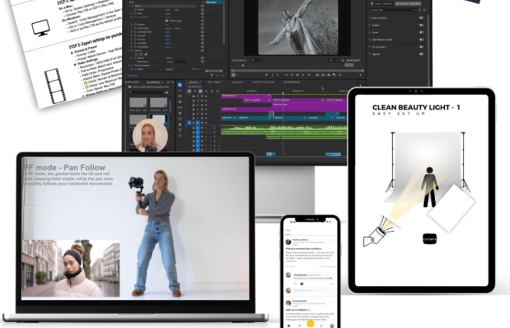
A structured end-to-end video production course. The supplied index moves from storytelling and concept development into shooting systems, camera settings, movement, directing, lighting and a complete Premiere Pro finishing workflow. Browse more professional creative training on Courses On Budget, the Design Courses category, and the Design Courses Cheap catalog.
What You Get in Eva Glasbeek – Video Campaign Formula
This is not a single-topic camera class. The indexed curriculum follows the production chain in order: create the idea, plan the visual direction, shoot with repeatable methods, control camera settings and movement, direct people on set, light the scene, then organize, edit, export and color-match the final footage in Premiere Pro.
- Concept development is grounded in Storytelling 101, ideation and moodboarding before camera work begins.
- The shooting section includes focal length choices, a 7-step shot method, a 3-point sequence method, continuity and practical creative tools.
- Camera setup covers exposure, focus, picture profiles, LUTs and frame-rate choices, backed by checklists and PDFs.
- The final module includes footage backup and selection, Premiere Pro workflow, horizontal-to-vertical conversion, export settings and color grading / matching.
Course Learning Path at a Glance
| Stage | Primary focus | Indexed evidence |
|---|---|---|
| Concept | Story, ideas and visual planning | Storytelling 101, concept development, moodboarding, location recce |
| Production | Repeatable shooting structure | Focal length, 7-step method, 3-point method, continuity, creative tools |
| Technical camera | Reliable capture settings | Exposure triangle, focus, picture profiles, LUTs, FPS |
| On-set execution | Movement, people and light | Stabiliser, handheld systems, directing talent, team dynamics, natural and studio light |
| Post-production | Organize and finish footage | Backup, Premiere Pro, edit workflow, vertical conversion, export and color matching |
Here’s What You Get:
This program is your blueprint on how to get there:
- Turn any loose idea into a strong, strategic video concept
- Learn my exact 3-step method that makes every sequence feel alive and intentional
- The 7-shot formula that gives your videos structure, rhythm and style
- ALL of my gear, settings & solo techniques – shown and explained in visual tutorials
- Clear, step-by-step lessons for beginners and videographers who are ready to level up
You’ll finally feel confident with a camera and start charging real professional rates.
| ▶ |
See a real lesson from this course
Unedited sample from the actual files. No login, no signup.
|
Full Course Structure
The accordion below preserves the supplied course index by its main sections so buyers can see exactly what is included before purchasing.
Module 1 — Build Your Concept
- 1.1 Storytelling 101 — MP4
- 1.2 The Concept: Coming Up With Ideas — MP4
- 1.3 Moodboarding: Visualising Your Ideas — MP4
- Bonus: Location Check / Recce — MP4
Module 2 — Shoot With Structure
- 2.1 Choose Your Weapon: What’s in My Bag — MP4
- 2.1 Choose Your Weapon: What’s in My Bag — PDF
- Gear List Videography — PNG
- 2.2 Pick Your Focal Length: It Changes More Than You Think — MP4
- 2.3 My 7-Step Method: The Shots That Will Save Every Video — MP4
- 2.4 The 3-Point Method: The Method That Brings Every Sequence to Life — MP4
- 2.5 Continuity: Make It Make Sense — MP4
- 2.6 Creative Tools: Cheap and Easy — MP4
- 2.7 All of the Methods in Action — MP4
- 2.7 All of the Methods in Action — PDF
- Bonus: Mental Preparation — MP4
Module 3 — Camera Settings Made Simple
- 3.1 Exposure Triangle: A Quick Refresher — MP4
- 3.2 Focus Settings: Settings to Follow Your Subject — MP4
- 3.3 Picture Profiles: Log / Cine4 Explained — MP4
- 3.3 Picture Profiles: Log / Cine4 Explained — PDF
- 3.4 Picture Profiles: Set Up Your Camera With Me — MP4
- 3.4 Picture Profiles: Set Up Your Camera With Me — PDF
- 3.5 LUTs Explained — MP4
- 3.5 LUTs Explained — PDF
- 3.6 Frame Rate / FPS: Why and When to Use This — MP4
- 3.7 Frame Rate: Set Up Your Camera With Me — MP4
- Camera Settings Checklist — PDF
Module 4 — Movement Gear
- 4.1 Camera Grip: What Are the Options — MP4
- 4.2 Stabiliser: How to Use — MP4
- 4.3 Handheld Cage / Top Handle: How to Use — MP4
- 4.4 Handheld Strap: How to Use — MP4
- 4.5 In-Camera Transitions: Creative Movement Hacks — MP4
- Bonus: Set Up Your Stabiliser With Me — MP4
Module 5 — Run a Shoot With Confidence
- 5.1 Directing Talent — MP4
- 5.2 Team Dynamics on Set: How to Deal With This and Lead a Team — MP4
Module 6 — Lighting 101
- 6.1 Natural Light: How to Work With Any Type of Natural Light — MP4
- 6.2 Studio Light: 4 Ready-to-Use Light Setups — MP4
- 6.3 DIY Lighting or Working With a Professional — MP4
Module 7 — Edit Fast, Finish Strong
- 7.0 Backing Up / Spotting / Selecting Your Footage — MP4
- 7.0 Backing Up / Spotting / Selecting Your Footage — PDF
- The Wedding Film — MP4
- 7.1 Everything You Need to Know About Premiere Pro — MP4
- 7.2 Import / Edit Workflow — MP4
- Una in Paris — A Short Film by Eva Glasbeek — MP4
- Favorite Video Assets / Colors — PDF
- 7.3 Horizontal to Vertical: How To — MP4
- 7.4 Export / Color Settings for Best Quality — MP4
- Export Settings Playbook — PDF
- Premiere Saturation Fix — CUBE
- 7.5 Color Grading / Matching in Premiere — MP4
- Premiere Saturation Fix — CUBE
Who This Course Is Built For
The curriculum is best matched to creators, videographers and filmmakers who want one connected workflow from idea generation through production and Premiere Pro finishing, rather than isolated lessons on only shooting or only editing.
- Covers the complete workflow from concept to final edit.
- Includes both creative decision-making and technical camera setup.
- Uses repeatable shooting methods rather than a loose collection of tips.
- Includes supporting PDFs, a gear image, checklists and CUBE files.
- Premiere Pro is the named editing environment in the indexed lessons.
- The curriculum is focused on video production; it is not presented as a general graphic-design course.
Related Design Courses & Guides
Continue the learning path through the Design Posts library or compare related courses below.
Eva Glasbeek – Video Campaign Formula has a clearly sequenced curriculum: concept, shoot structure, camera configuration, movement, directing, lighting and post-production. The strongest reason to choose it is the continuity of that workflow—every major stage visible in the supplied index belongs to the same production process.
Get the course through Eva Glasbeek – Video Campaign Formula,
browse the full Design Courses catalog,
or check Courses On Budget updates for newly added training.

Reviews
There are no reviews yet.