

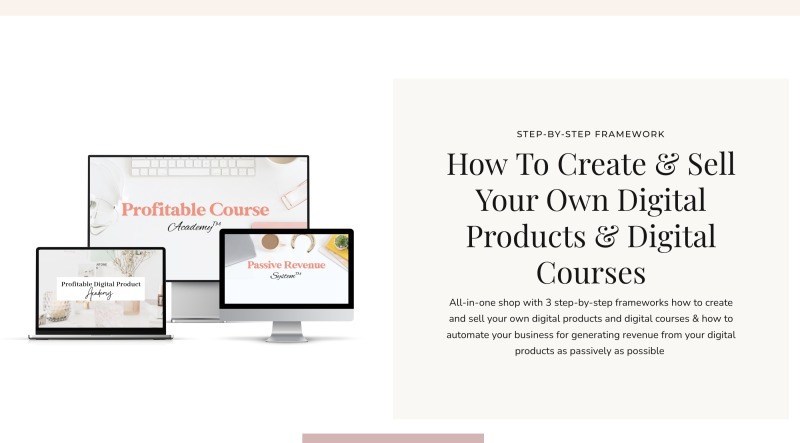
Natalia Raitomaki Profitable Digital Product Bundle: From Life Experience to a Selling Digital Product
Most people with real knowledge never turn it into a product, because the first steps feel foggy: which topic, which format, which platform? This bundle is built to remove that fog with three step-by-step frameworks for creating, selling and automating digital products and online courses.
The promise is a business you can run from home or while travelling, with the heavy lifting handled by templates, checklists and funnels you modify instead of building from scratch.
Beyond the three core frameworks, the files include a full Instagram Reels training, a library of reel-editing tutorials and a legal bonus on protecting your business.
What you will be able to do
- Spot a niche and profitable product or course topics based on your own life experience
- Grow an audience with social media and email marketing strategies
- Create digital products and courses using ready-made templates
- Install high-converting sales funnels from pre-made templates
- Write launch email sequences and set up the automation behind them
- Build a passive revenue funnel around pre-recorded webinars
Quick facts about the bundle
| Detail | Information |
|---|---|
| Author | Natalia Raitomaki |
| Niche | Ecommerce courses (digital products and online courses) |
| Format | Digital files: video lessons, PDF worksheets, spreadsheets and zip templates |
| Videos | 222 video files |
| Sections | 6 main sections, 45 folders in total |
| Total size | 15.46 GB across 375 files |
| Language | English |
| Delivery | Manual, after crypto payment confirmation |
How to get the bundle in four moves
Inside the Natalia Raitomaki Profitable Digital Product Bundle
Six sections, each with its own modules, worksheets and templates. Open any block to see the real lesson titles.
Tap a section to expand
📂 Business Reels Academy 58 lessons
- New Student Onboarding
- Welcome to the Business Reels Academy
- + 2 worksheet/PDF/template files
- Module 1 – Foundations
- Lesson 1 How to nail your niche
- Lesson 2 How to find your ideal clients
- Lesson 3 Instagram bio optimization for the right traffic
- Lesson 4 Four step strategy to getting reels in front of ideal clients
- Lesson 5 Strategy for building brand awareness
- + 6 worksheet/PDF/template files
- Module 2 – Reel strategy | Traffic Explosion
- Lesson 1 Reel strategies for audience growth
- Lesson 2 Reel strategies for more views
- Lesson 3 Reel strategies for more engagement
- + 7 worksheet/PDF/template files
- Module 3 – Reel growth | Set your reels for success
- Lesson 1 Best practices and do’s & don’ts
- Lesson 2 How to find and leverage reel trends
- Lesson 3 How to create reels like a pro
- Lesson 4 How to hack the algorithm
- Lesson 5 Reel success checklist
- + 2 worksheet/PDF/template files
- Module 4 – Framework | Reel Conversion Strategy
- Lesson 1 How to write reel captions
- Lesson 2 How to use hashtags
- Lesson 3 How to convert more strangers into followers
- Lesson 4 How to build your client base
- + 5 worksheet/PDF/template files
- Module 5 – Process | Streamlining reel creation
- Module 5: Process – Streamlining reel creation
- Lesson 2 How to plan and organize your reels
- Lesson 3: How to schedule & automate reels in Meta Business
- Lesson 4 Time saving bonus tips for creating reels
- BONUS: How to schedule your reels without automating
- + 5 worksheet/PDF/template files
- Module 6 – Become a reel pro | Creating high-quality reels
- Lesson 1 Three ways to film reels
- Lesson 2 How to film reels in Instagram
- Lesson 3 How to add different overlay text fonts
- Lesson 4 How to edit reels in Instagram
- Lesson 5 How to upload high quality reels
- Lesson 6 How to find reel stickers
- Lesson 7 How to find reel effects in Instagram
- Lesson 8 How to add a picture inside your reel in Instagram
- Lesson 9 How to add a video inside your reel in Instagram
- Lesson 10 How to speed up or slow down your reel
- + 4 worksheet/PDF/template files
- Module 7 – Sales basics | Ensuring business success
- Lesson 1 Business plan and revenue goal
- Lesson 2 Reel strategy for business growth
- Lesson 3 How to prime your audience to buy
- Lesson 4 How to track your leads
- + 3 worksheet/PDF/template files
- Module 8 – Sales strategy | Selling with reels
- Lesson 1 How to sell on Instagram and best practices
- Lesson 2 Five ways to generate sales with reels
- Lesson 3 Five step strategy to closing a sale
- Lesson 4 Sales strategies for a product-based business
- Lesson 5 Sales strategies for an MLM marketer
- Lesson 6 Sales strategies for a service-based business
- Lesson 7 Sales strategies for a coaching or a consulting business
- + 9 worksheet/PDF/template files
- Module 9 – Success tracker | Track reel success
- Lesson 1 Why some reels get more views and less engagement?
- Lesson 2 Why am I attracting competitors?
- Lesson 3 Why am I not attracting the right people?
- Lesson 4 Why am I getting views but no comments?
- Lesson 5 Why am I not getting views?
- Lesson 6 Why am I getting views but not followers?
- Lesson 7 Why am I getting followers but not clients?
- Lesson 8 Why am I losing followers?
- Lesson 9 Why am I not growing?
- + 9 worksheet/PDF/template files
- Bonus Lessons
- How to organize reels on your phone & use a content scheduling app
- How to create a reel cover photo
- Hashtag strategy
- How to record a reel on TikTok
- How to store reels in Google Drive
📂 Reels Library 37 lessons
- Reel transitions for beginners
- How to make a lip-syncing reel
- How to make a ‘clap’ transition
- How to make a ‘cover the camera’ transition
- How to make a ‘swipe’ transition
- How to make a ‘throw the phone’ transition
- How to make a ‘throw the computer’ transition
- How to make a ‘phone handover’ transition
- How to make an ‘Infinite 1’ transition
- Faceless and promotional reels
- Basic features in CapCut and how to trim your reel
- How to make a faceless reel in Canva
- How to make a reel with pictures and or videos in Instagram
- How to make a reel with moving pictures and videos
- How to create a reel tutorial with an Instagram phone mockup
- How to make a reel zooming in and out
- How to make a ‘moving in a circle’ reel
- How to make a ‘swipe and zoom in’ reel
- How to make a ‘phone tilt’ reel
- How to make a ‘snapping fingers’ transition with products
- How to make a ‘tapping on the table’ transition with products
- How to make an ‘ordering products from the screen’ transition
- How to make a slow motion reel with products
- How to make a ‘moving a product from the phone on to the table’ transition
- Reel transitions for experienced
- How you can add sound effects and stickers in your reels
- How to add a floating phone inside your reel
- How to add layered pictures inside your reel
- How to add an ‘earthquake’ effect
- How to create a ‘shirt color change’ -reel
- How to add a moving phone inside your reel
- How to add a background to your reel or green screen effect
- Popping out of the cup transition
- How to make and add stickers and pictures inside your reel
- How to add cool effects inside the reel
- ‘Body disappearing’ reel
- ‘Shoe throw’ transition
- How to clone yourself
- Jump and outfit change transition
- How to add disappearing text bubbles
📂 Profitable Course Academy 61 lessons
- Module 1 – How to prepare for your course creation & launch
- Lesson 1: Welcome and what to expect
- Lesson 2: Productivity
- Lesson 3: How to deliver your course
- Lesson 4: Choose your launch type
- Lesson 5: Setting your revenue goals
- Lesson 6: Platforms & software
- Lesson 7: Business foundations
- + 2 worksheet/PDF/template files
- Module 2 – Profitable course elements
- Lesson 1: How to niche down
- Lesson 2: Choose your course topic
- Lesson 3: Map out your dream student
- Lesson 4: How to test the profitability
- Lesson 5: How to name your course
- Lesson 6: How to set your course pricing
- Lesson 7: Set your timeline
- + 9 worksheet/PDF/template files
- Module 3 – Building your audience
- Lesson 1: How to position your course in the market
- Lesson 2: Sharing your personal story
- Lesson 3: How to build your audience full of future students
- Lesson 4: How to grow audience without social media
- Lesson 5: How to build your list, part 1
- Lesson 6: How to build your list, part 2
- Lesson 7: How to build your list, part 3
- + 4 worksheet/PDF/template files
- Module 4 – Creating your course
- Lesson 1: How to teach inside your course
- Lesson 2: How to outline your course
- Lesson 3: How to create your course lessons
- Lesson 4: How to record your lessons
- Lesson 5: How to modify the lesson template
- Lesson 6: How to edit your lessons
- Lesson 7: How to set up your online course
- Module 5 – Launching your course
- Lesson 1: How to increase enrollments
- Lesson 2: How to create an irresistible launch offer
- Lesson 3: How to get people to buy during your launch
- Lesson 4: How to create a high converting sales page
- Lesson 5: How to create a checkout page
- Lesson 6: How to create a Thank you page
- Lesson 7: Launch strategy
- Lesson 8: How to create and schedule emails
- + 5 worksheet/PDF/template files
- Module 6 – Scaling your course
- Lesson 1: How to onboard and support your students
- Lesson 2: How to collect feedback and testimonials
- Lesson 3: How to handle the refunds
- Lesson 4: How to plan your next launch
- Lesson 5: How to turn your students into affiliates
- + 1 worksheet/PDF/template file
- Tech Library & Resources
- How to modify Canva freebie template
- How to create a freebie opt in page in Kajabi
- How to create a course waitlist page in Kajabi
- How to create a course lesson in Canva
- How to trim and edit your lessons in iMovie
- How to create your online course in Kajabi
- How to create a high converting sales page
- How to create a checkout page & a promo coupon in Kajabi
- How to create a Thank you page
- How to create and schedule emails in Kajabi
- How to create a countdown timer for a sales page in Kajabi
- How to create a countdown timer in Motionmailapp for your emails
- How to create a Drift chat box
- How to store your course content in Google Drive
- + 4 worksheet/PDF/template files
- Tech Library & Resources › Supportive Material
- 22 PDF/document files
- BONUS – Course set up in Systeme.io
- Step 1: Set up your account
- Step 2: List building – email marketing set up
- Step 3: Set up your waitlist page
- Step 4: Create your course
- Step 5: Create your sales page
- Lesson 6: How to create and send your launch emails
📂 Passive Revenue System 40 lessons
- Module 1 – Introduction to passive revenue funnel
- Lesson 1: What is passive revenue funnel
- Lesson 2: Why do you need a passive revenue funnel
- Lesson 3: Choose your passive revenue funnel
- Lesson 4: Passive revenue funnel strategy & software
- Lesson 5: The right mindset
- Lesson 6: How to increase sales right now
- + 3 worksheet/PDF/template files
- Module 2 – How to create your webinar
- Lesson 1: How to choose a profitable webinar topic
- Lesson 2: How to test the profitability of your webinar topic
- Lesson 3: How to create a high-converting webinar structure
- Lesson 4: Webinar presentation: Best practices
- Lesson 5: How to modify your webinar presentation slides
- Lesson 6: How to record your webinar presentation
- Lesson 7: How to edit your webinar presentation video
- + 3 worksheet/PDF/template files
- Module 3 – How to set up your webinar registration page
- Lesson 1: How to create a high-converting webinar registration page
- Lesson 2: How to modify your webinar registration page template
- + 4 worksheet/PDF/template files
- Module 4 – How to set up your passive revenue funnel
- Lesson 1: How to set up your passive revenue funnel
- Lesson 2: How to create an automated email sequence
- Lesson 3: ‘Watch instantly’ funnel #1 set up: How to set up your sales pages
- Lesson 3: How to finalize ‘watch instantly’ funnel #1
- Lesson 4: ‘Scheduled webinar’ funnel #2 set up: How to set up sales pages
- + 2 worksheet/PDF/template files
- Module 5 – How to grow your audience
- Lesson 1: How to grow your audience & increase sign ups
- Lesson 2: Short form social media content
- Lesson 3: Evergreen content
- Lesson 4: How to finalize ‘scheduled webinar’ funnel #2
- Lesson 4: How to grow audience without social media
- Lesson 4: To finalize ‘scheduled webinar’ funnel #2
- + 1 worksheet/PDF/template file
- Module 6 – How to scale your passive revenue funnel
- Get Clients instead of -followers: and monetize your Business
- Lesson 2: How to scale your passive revenue funnel
- + 1 worksheet/PDF/template file
- Tech Library & Resources
- How to create a Drift chat box
- How to modify your webinar presentation slides in Canva
- How to record your webinar presentation slides
- How to edit your webinar presentation video
- How to modify your webinar registration page
- ‘Watch instantly’ funnel #1 set up: How to set up your sales pages
- ‘Scheduled webinar’ funnel #2 set up: How to set up your sales pages
- How to create an automated email sequence
- How to finalize ‘watch instantly’ funnel #1
- How to finalize ‘scheduled webinar’ funnel #2
- + 8 worksheet/PDF/template files
- Tech Library & Resources › Supportive material
- 12 PDF/document files
- BONUS – Set up in Systeme.io
- Set up your Systeme io account
- How to increase sales right now
📂 Profitable Digital Product Academy 25 lessons
- Module 1 – Choosing Your Profitable Niche & Digital Products
- Welcome
- Lesson 1: Choose your niche & a profitable topic
- Lesson 2: Identify your ideal client
- Lesson 3: Choose your digital products
- Lesson 4: Business foundations
- + 6 worksheet/PDF/template files
- Module 2 – Digital Product Creation
- Lesson 1: How to create your brand
- Lesson 2: How to name your digital product
- Lesson 3: How to structure your digital products
- Lesson 4: How to create your digital products in Canva
- Lesson 5: How to set your digital product pricing
- + 4 worksheet/PDF/template files
- Module 3 – Setting Up Your Digital Products Store
- Lesson 1: How to set up your store
- Lesson 2: How to create your free account
- Lesson 3: How to modify the sales page funnel template
- Lesson 4: How to finish up your store
- + 3 worksheet/PDF/template files
- Module 4 – Building Your Audience Full Of Clients
- Lesson 1: Social media strategy & plan
- Lesson 2: Instagram content strategy
- Lesson 3: Instagram content types & structure
- Lesson 4: Facebook page set up
- Lesson 5: Instagram page set up
- + 2 worksheet/PDF/template files
- Module 5 – Automating your sales process flow
- Lesson 1: Schedule & automate your Instagram content
- Lesson 2: Sales automation process
- Lesson 3: Set up your sales automation process
- Lesson 4: Test your sales automation process
- Lesson 5: Set your revenue goals
- BONUS: How to analyze your Instagram insights
- + 1 worksheet/PDF/template file
Your goal and where this bundle covers it
Not sure where to start? Match your next milestone to the part of the bundle built for it.
| Your goal | Where it is covered |
|---|---|
| Find a niche and a product idea | Profitable Digital Product Academy, Module 1: niche and topic, ideal client, product choice, plus ideas and niche worksheets |
| Get Instagram Reels in front of ideal clients | Business Reels Academy, Modules 1 to 3: niche, bio optimization, reel strategy, trends and the algorithm |
| Create, outline and name an online course | Profitable Course Academy, Modules 2 and 4: course topic, dream student, naming, lesson recording and setup |
| Build a sales page, checkout and thank-you page | Profitable Course Academy, Module 5, with page templates in the Tech Library |
| Sell with a webinar on autopilot | Passive Revenue System, Modules 2 to 4: topic, structure, registration page and two funnel setups |
| Understand why reels are not converting | Business Reels Academy, Module 9: nine diagnostic lessons from “why am I not growing?” to “followers but not clients” |
| Protect the business legally | Bonus section: legal guide, trademark guide and a tax-deductions PDF |
Who the Natalia Raitomaki Profitable Digital Product Bundle suits best
Coaches, consultants, service providers, product sellers and creators who want to package what they know into a digital product or course and sell it through Instagram, email and funnels. The reel content matrices even split advice by business type, so you can follow the track that matches yours.
- You want a one-to-one mentor: these are self-paced files
- You prefer physical-product ecommerce such as dropshipping or ads
- You need a short course: this download is 15.46 GB across 222 videos
Pros and cons at a glance
- Three frameworks plus reels training in one download
- 222 video files with worksheets, checklists and templates
- Covers niche, creation, store, funnel and automation end to end
- Includes a legal and trademark bonus
- Templates (.zip) for opt-in, waitlist, sales and thank-you pages
- Digital files only, no physical items
- Crypto payment only
- Delivery is manual after payment confirmation
- Self-paced study with no live support included
- Large download: 15.46 GB
- One Passive Revenue folder is labelled “Coming Soon” and is empty
Frequently asked questions
What does the Natalia Raitomaki Profitable Digital Product Bundle include?
Six sections: a legal bonus, Business Reels Academy, Reels Library, Profitable Course Academy, Passive Revenue System and Profitable Digital Product Academy. Together they hold 222 video files plus worksheets, checklists and templates.
Do I need an Instagram audience to benefit?
No. Instagram and Reels have their own academy, but the course academy also includes a lesson on growing an audience without social media and lessons on building an email list.
Which tools do the lessons demonstrate?
Tutorials in the file index reference Kajabi, Systeme.io, Canva, CapCut, iMovie, Meta Business and Drift, among others.
What format are the lessons in?
Video files (mp4 and ts), PDF worksheets and cheat sheets, an xlsx hashtag bank and zip page templates.
How and when do I receive it?
You pay in crypto, and the files are delivered manually after payment confirmation. Links stay active for 7 days, so download everything promptly.
If your bottleneck is “where do I even start?”, the Natalia Raitomaki Profitable Digital Product Bundle answers it in order: pick the niche, build the product, open the store, then automate. You are not guessing; you follow a sequence with worksheets at every stage.
It is a big, practical stack, so pick one academy first, finish its worksheets, and move on. That is how a 15.46 GB download becomes a working product instead of a folder you never open.
Browse the category: Ecommerce courses on Courses On Budget
Landing list: Cheap ecommerce courses
Updates: Latest site updates
Coupon: See the coupon page
Recommended course stack:


Reviews
There are no reviews yet.