
What Is the Google Ads Training Course Bundle?
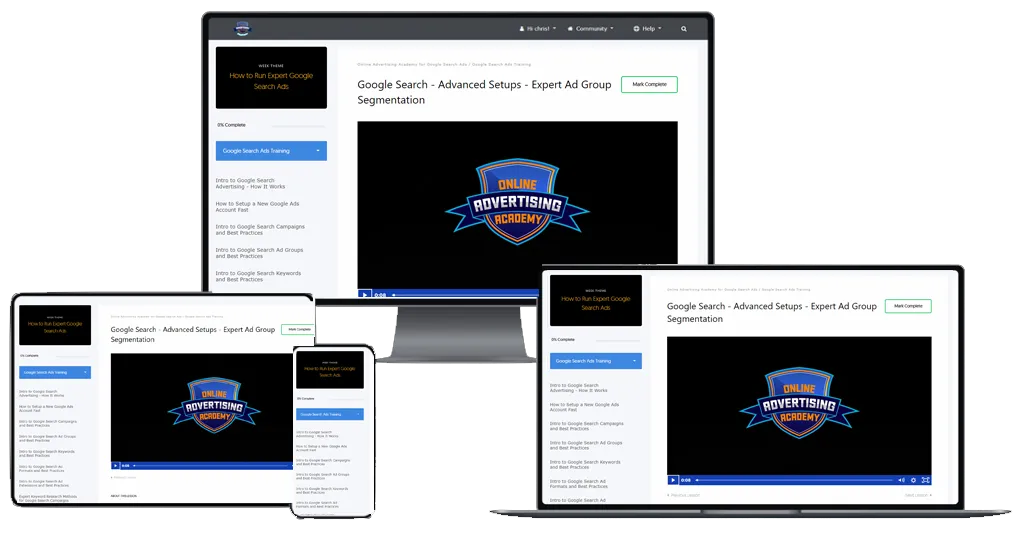
Online Advertising Academy – Google Ads Training Course Bundle unveils strategies to master Google’s advertising platform and potentially transform your online marketing efforts and ROI. It covers everything from basic account setup to advanced bidding strategies, so you get a thorough education in paid search whether you are new to Google Ads or refining your existing campaigns.
Inside you will find two Google Search Ads Masterclasses with 47 video lessons: display campaigns and remarketing, audience and content targeting, launch checklists, optimization, tracking with GA4, and a Microsoft Bing Ads network module. Explore related paid-traffic programs in our Ecommerce Courses category and the full ecommerce courses list.
Key Benefits
By mastering these skills you can transform your approach to online advertising, potentially increasing click-through rates and conversions. It equips you with tools to improve targeting precision and open new opportunities in digital marketing.
Course at a Glance
| Detail | Google Ads Training Course Bundle |
|---|---|
| Provider | Online Advertising Academy |
| Format | Video lessons (MP4) |
| Content | 2 masterclasses · 47 files · 16 folders |
| Total size | 10.27 GB |
| Category | Ecommerce Courses |
| Delivery | Manual, after crypto payment confirmation |
| Access | Download links active for 7 days |
How to Get It
Digital files. Crypto payment only. Fast delivery is handled manually after payment confirmation. Download links remain available for 7 days; save your files locally. New to crypto? How to pay on site · How to buy crypto
Course Contents
Google Search Ads Masterclass 1 · 29 video lessons
📂 Intro to the Course – Watch This First
- Welcome
📂 Intro to Display Campaigns
- Intro to Google Display Ads – How it Works
- Intro to Google Display Campaigns and Ad Groups and Best Practices
- Full Walkthrough – Setting Up a Google Display Campaign Start to Finish
- Display Banner Ad Formats and Best Practices
📂 Advanced Display Remarketing
- How to Setup Advanced Remarketing Audiences for Display Ads
- Advanced Remarketing Campaigns for Display Ads Best Practices
📂 Display Targeting by Audience
- Google Display – Creating Custom Audiences
- Google Display – Custom Audience Targeting Best Practices
- Google Display – In-Market and Life Events Targeting Best Practices
- Google Display – Affinity Audiences Targeting Best Practices
- Google Display – Demographics Targeting Best Practices
- Google Display – Best Practices for Stacking Multiple Audience Targeting
📂 Display Targeting by Content
- Google Display – Contextual Keyword Targeting Best Practices
- Google Display – Website Topics Targeting Best Practices
- Google Display – Website Placements Targeting Best Practices
- Google Display – Website Placements Local News Targeting Best Practices
📂 Display Campaign Launch Checklists
- Google Display Campaign Pre-Launch Optimization Checklist
- Google Display – Common Advertising Restrictions to Avoid
📂 PPC Tools Bonus Training
- How to Use Landing Pages for Better PPC Performance
- How to Use Call Tracking for PPC – Best Call Tracking Software
- How to Create Better Ads – Best PPC Ad Tools
📂 Display Campaign Optimization
- Google Display Optimization – Blocking Bad Traffic Best Practices Part 1
- Google Display Optimization – Blocking Bad Traffic Best Practices Part 2
- Google Display Optimization – Campaigns
- Google Display Optimization – Finding the Best Website Placements
- Google Display Optimization – Display Ad Scaling and A&B Testing
📂 Google Analytics and Tracking Training
- Migrating to GA4 – Tracking, Remarketing, Google Ads Linking
- Importing Conversions from GA4 to Google Ads
Google Search Ads Masterclass 2 · 18 video lessons
📂 Masterclass Expert Optimization for Large Budgets
- Google Search – Advanced Optimizing – Keywords
- Google Search – Advanced Optimizing – Ads and A&B Testing
- Google Search – Advanced Optimizing – Expanding and Testing New Campaigns
📂 Microsoft Bing Ads Network Training
- Intro to Microsoft Bing Ads Search Network – How it Works
- Microsoft Bing Ads Dashboard Walkthrough – How to Navigate the System
- How to Import Campaigns from Google Ads to Microsoft Bing Ads
- How to Setup Microsoft Bing Ads UET Tracking Code – Conversion Tracking
- Full Walkthrough – Setting Up a Microsoft Bing Ads Search Campaign Start to Finish
- Microsoft Bing Ads Advanced Optimizing Strategies – What You Can’t Do In Google
- BONUS – Optimizing for Responsive Search Ads
- BONUS – Optimizing Multimedia Ads
- BONUS – Expert Audience Targeting Training by Company, Industry, or Job
- BONUS – Expert Search Remarketing Training (RLSA)
📂 PPC Tools Bonus Training
- How to Use Landing Pages for Better PPC
- How to Use Call Tracking for PPC
- How to Create Better Ads – Best PPC
📂 Google Analytics and Tracking Bonus Training
- Migrating to GA4 – Tracking, Remarketing
- Importing Conversions from GA4 to Google Ads
Masterclass 1 vs Masterclass 2
| Search Ads Masterclass 1 | Search Ads Masterclass 2 | |
|---|---|---|
| Lessons | 29 videos | 18 videos |
| Main focus | Display campaigns, remarketing, audience and content targeting, launch checklists, optimization, GA4 | Advanced search optimization for large budgets, full Microsoft Bing Ads training |
| Bonus modules | PPC tools, GA4 tracking | PPC tools, GA4 tracking, Bing bonus lessons |
| Best used | To build and optimize display campaigns | To expand into Bing and refine search at scale |
Who Is It For?
- 47 video lessons in two masterclasses
- Covers Display, Search and Microsoft Bing Ads
- Includes GA4 tracking and conversion import
- Landing page, call tracking and ad-tool bonuses
- Large 10.27 GB download
- Some bonus modules repeat between masterclasses
- Crypto payment only; links active for 7 days
Frequently Asked Questions
Does the bundle include Microsoft Bing Ads training?
Yes. Masterclass 2 contains a Microsoft Bing Ads Network Training module with lessons from dashboard walkthrough to UET tracking and advanced optimization.
Is it suitable for beginners?
The course covers everything from basic account setup to advanced bidding strategies, so it works for beginners and for marketers refining existing campaigns.
How large is the download?
The full package is 10.27 GB across 47 files, so make sure you have enough storage and save your files locally within the 7-day link window.
The Google Ads Training Course Bundle is a large, practical video library for anyone serious about paid search and display advertising. Get it via Courses On Budget and track new releases on the updates page.
Want a complementary paid-ads angle? Combine it with a Facebook ads program from the same category.
Browse the category: Ecommerce Courses
Full list: Ecommerce Courses Cheap
External resource: ads.google.com
Recommended course stack:

Reviews
There are no reviews yet.