

















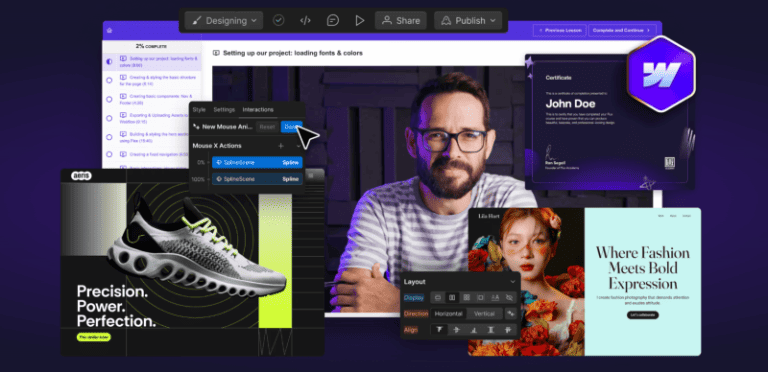
What is Ran Segall Webflow Masterclass 5.1 Pro for Cheap?
Here’s What You Get:
- Action-packed video lessons that teach Webflow through real client scenarios
- Hands-on practice with three full Webflow projects for both beginners and advanced users
- 8-week private mentoring and expert feedback from Flux Academy mentors
- Training led by industry expert and Flux Academy founder Ran Segall
- Lifetime access to all content and free updates as Webflow evolves
Webflow Masterclass 5.1 Pro is a comprehensive, hands-on course built for designers, creators, and freelancers who want to master Webflow and turn their skillset into high-value client work. Led by Ran Segall, the program goes beyond technical training by integrating real-world projects, business strategy, and mentorship.
Platform Overview & Structure
- Step-by-step video lessons that walk you through Webflow fundamentals and advanced features like interactions, grid, CMS, and animations
- Multiple hands-on projects where you build full websites from scratch
- Weekly office hours, private mentoring, and peer review to refine your skills
- Lifetime access to the entire curriculum and future course updates
Core Learning Focus
- Webflow basics: layout systems, flexbox, grid, responsive structure, and workflow
- Advanced features: dynamic content, CMS, interactions, animations, scalable systems
- Professional workflows: components, efficiency systems, and reusable design structures
- Business & freelancing modules including pricing, proposals, client onboarding, and delivery
Advantages & Key Benefits
- A complete all-in-one learning path suitable for beginners and advanced designers
- Project-based learning that builds real-world confidence and technical mastery
- Mentorship and community support to help troubleshoot challenges and accelerate progress
- Lifetime updates that ensure your skills evolve alongside Webflow’s latest features
- Business-focused training so you can turn Webflow mastery into client revenue
▶️ SAMPLE:
▶️ SAMPLE:
Ran Segall Webflow Masterclass 5.1 Pro Index:
📂 01-Webflow Masterclass 5.0 Pro Content
- 📂 01-Working with Clients Building Your Webflow Career
- 📄 01- Introduction Process Overview.pdf (15.16 KB)
- 📄 01-Introduction Process Overview.mp4 (45.47 MB)
- 📄 02- Effective Project Management- Notion Template Starter Project Communication Feedback.pdf (18.38 KB)
- 📄 02-Effective Project Management Notion Template Starter Project Com.mp4 (655.29 MB)
- 📄 03- Ultimate Webflow Build Checklist.pdf (15.22 KB)
- 📄 03-Ultimate Webflow Build Checklist.mp4 (950.53 MB)
- 📄 04- Pricing Proposals Closing Deals.pdf (15.82 KB)
- 📄 04-Flow Gurus – QUOTE TEMPLATE v1.0 COMMUNITY COPY.xlsx (99.65 KB)
- 📄 04-Pricing Proposals Closing Deals.mp4 (747.94 MB)
- 📄 05-Onboarding Managing Client Expectations.mp4 (451.86 MB)
- 📄 06- Lesson 6 Correcting Skintones.mp4 (1.10 GB)
- 📄 06- Transferring Project Smooth Launches.pdf (11.35 KB)
- 📄 06-Transferring Project Smooth Launches.mp4 (461.31 MB)
- 📄 07-3D Globe interaction.mp4 (10.48 MB)
- 📄 07-Client Training Handover Example videos.mp4 (320.67 MB)
- 📄 07-Customer reviews CMS slider.mp4 (38.49 MB)
- 📄 07-Heading text icon images.mp4 (7.33 MB)
- 📄 07-HiThrive update pricing.mp4 (8.12 MB)
- 📄 07-How to Add a New Progress or Update Article.mp4 (56.11 MB)
- 📄 07-How to Update Resources.mp4 (12.55 MB)
- 📄 07-June Lake – Welcome to Webflow.mp4 (96.77 MB)
- 📄 07-Supreme Skips – Updating-changing prices.mp4 (13.73 MB)
- 📄 07-Wedgetail – Upload blog post.mp4 (54.43 MB)
- 📄 08-Finding Retaining New Clients.mp4 (986.17 MB)
- 📄 09-Becoming a Webflow Expert.mp4 (407.50 MB)
- 📄 09-Becoming a Webflow Expert.pdf (11.09 KB)
- 📄 10-Scaling into a Webflow Agency.mp4 (594.46 MB)
- 📂 02-Working Together with Team Members
- 📄 01-Creating Managing Team Accounts.mp4 (820.40 MB)
- 📄 02-Establishing a Collaborative Workflow for Designers and Develope.mp4 (774.63 MB)
- 📄 02-Establishing a Collaborative Workflow for Designers and Developers.pdf (10.90 KB)
- 📄 02-Flow Gurus – Webflow Starter Kit.pdf (9.63 MB)
- 📄 03-Styling Structuring Considerations for Teams.mp4 (1.03 GB)
- 📄 04-Team Project Management Organization.mp4 (816.55 MB)
- 📂 03-Conclusion Whats Next
- 📄 01-Conclusion Whats Next.mp4 (44.50 MB)
- 📂 04-The Ultimate Webflow Build Checklist – PRO Course
- 📄 01- Introduction.mp4 (84.46 MB)
- 📄 02-Getting Started.mp4 (24.23 MB)
- 📄 03- Values and Principles.mp4 (152.09 MB)
- 📄 04-Client Onboarding.mp4 (180.12 MB)
- 📄 06- Review design.mp4 (583.73 MB)
- 📄 07- Plan fonts colors spacing.mp4 (70.31 MB)
- 📄 08-Export Figma assets.mp4 (136.36 MB)
- 📄 09- 301 redirects and URL map.mp4 (279.40 MB)
- 📄 09- 301 redirects and URL map.pdf (11.09 KB)
- 📄 10-Create Webflow account.mp4 (41.18 MB)
- 📄 11- Create Webflow project.mp4 (665.52 MB)
- 📄 12-Create MarkUp and Loom links.mp4 (18.53 MB)
- 📄 13- Import Figma assets.mp4 (28.69 MB)
- 📄 14- Set up ALL pages.mp4 (137.10 MB)
- 📄 15- Import Relume components.mp4 (370.68 MB)
- 📄 16- Style guide setup.mp4 (313.67 MB)
- 📄 17-Nav and footer links.mp4 (50.48 MB)
- 📄 18-Create DONE DONE DONE.mp4 (75.49 MB)
- 📄 19- Build easy.mp4 (271.93 MB)
- 📄 20- Build tricky.mp4 (234.75 MB)
- 📄 21-Technical SEO.mp4 (72.16 MB)
- 📄 22- Integrations and automations.mp4 (66.36 MB)
- 📄 23-Make it sexy.mp4 (159.32 MB)
- 📄 24- Clean up.mp4 (387.49 MB)
- 📄 25-Flow Gurus audit.mp4 (1.46 GB)
- 📄 26-MarkUp tweaks Client Review.mp4 (154.83 MB)
- 📄 27-Transfer.mp4 (529.27 MB)
- 📄 28-Set up hosting.mp4 (88.48 MB)
- 📄 29- Add 301 redirects.mp4 (86.94 MB)
- 📄 30- Pre-launch checks.mp4 (124.12 MB)
- 📄 31-Go live.mp4 (515.77 MB)
- 📄 32-Post-live testing.mp4 (94.36 MB)
- 📄 33- Handover.mp4 (606.24 MB)
- 📄 34-Post-live tweaks.mp4 (202.03 MB)
- 📄 35- Customer feedbac.mp4 (66.46 MB)
- 📄 36- Compile case study promote.mp4 (283.73 MB)
- 📄 37- 30 day review.mp4 (128.25 MB)
- 📄 38-Review and improve.mp4 (61.66 MB)
- 📂 05-Bonus
- 📄 01- How to automate customer feedback.pdf (10.60 KB)
- 📄 01-How to automate customer feedback.mp4 (136.36 MB)
📂 02-Webflow Masterclass 5.1
- 📂 01-Introduction
- 📄 01-Welcome How to Succeed in This Program.mp4 (256.67 MB)
- 📄 01-Welcome How to Succeed in This Program.pdf (20.99 KB)
- 📄 02-What Webflow subscription you need for this course.mp4 (128.46 MB)
- 📄 02-What Webflow subscription you need for this course.pdf (29.43 KB)
- 📄 03- Introduction to Webflow UI UI Updates.pdf (18.83 KB)
- 📄 03-How to send us a sandbox link aka the old read-only link – 24 Octo.mp4 (13.16 MB)
- 📄 03-Introduction to Webflow UI UI Updates.mp4 (237.26 MB)
- 📄 04- How does mentoring work.pdf (43.09 KB)
- 📂 02-Web Design Concepts You MUST Understand to succeed with Webflow
- 📄 01- What is HTML-CSS.pdf (13.74 KB)
- 📄 01-What is HTMLCSS.mp4 (258.94 MB)
- 📄 02-How Content Flows on the Web.mp4 (104.12 MB)
- 📄 03-The Box Model.mp4 (109.29 MB)
- 📄 04-Nesting Cascading.mp4 (199.06 MB)
- 📄 04-Webflow Beginner Series 4 – The Cascading Down Principle.mp4 (206.24 MB)
- 📄 05-How Styling Works Global Classes Combo Classes HTML Tags.mp4 (295.37 MB)
- 📄 06- How to use Flex AKA Auto-Layout.pdf (20.99 KB)
- 📄 06-Flexbox Horizontal Masonry Layout in Webflow No Code Tutorial Fully Responsive Accessible.mp4 (784.51 MB)
- 📄 06-How to use Flex AKA Auto-Layout.mp4 (185.03 MB)
- 📄 06-Webflow Flexbox Design Patterns.mp4 (519.63 MB)
- 📄 07-Webflow Beginner Series 2 – Sections Containers Div Blocks Debunked.mp4 (178.25 MB)
- 📄 07-Why we use wrappers.mp4 (106.82 MB)
- 📄 08-The Right Structure for EVERY Page.mp4 (214.68 MB)
- 📄 09-Measurements Pixels VWVH EMREM.mp4 (219.36 MB)
- 📄 10-What are variables Flux Academy.mp4 (120.45 MB)
- 📂 03-Building Strong Foundations
- 📄 01- Assets for this module.pdf (25.86 KB)
- 📄 01-Prtfolio-assets.zip (59.93 MB)
- 📄 01-WFM5 – Level 1 – CMS Content.docx (7.98 KB)
- 📄 01-WFM5 Fundations STUDENTS.pdf (36.10 MB)
- 📄 02-Setting up our project loading fonts colors.mp4 (313.92 MB)
- 📄 02-Webflows Workspace Plans Explained To My Hypothetical 10-year-old Daughter.mp4 (180.99 MB)
- 📄 03-Creating styling the basic structure for the page.mp4 (312.81 MB)
- 📄 04-Creating basic components Nav Footer.mp4 (160.04 MB)
- 📄 05- Exporting Uploading Assets to Webflow.pdf (22.08 KB)
- 📄 05-Exporting Uploading Assets to Webflow.mp4 (352.82 MB)
- 📄 06-Building styling the hero section using Flex.mp4 (609.72 MB)
- 📄 07-Creating a fixed navigation.mp4 (279.35 MB)
- 📄 08-Basic interactions Hover states.mp4 (271.84 MB)
- 📄 09-Creating a bento design using Grid Utility Classses.mp4 (738.34 MB)
- 📄 09-Webflows Navbar Mega Menu – Ep 1- Desktop Structure Hover Interactions No Code Tutorial.mp4 (1.06 GB)
- 📄 10-Understanding Webflows CMS.mp4 (285.37 MB)
- 📄 11-Setting up a basic CMS Projects collections.mp4 (486.99 MB)
- 📄 12-Creating the projects section using the Collection list.mp4 (604.98 MB)
- 📄 12-Creating the projects section using the Collection list.pdf (17.61 KB)
- 📄 13-Advanced Styling Even CMS Item Flip using Flex.mp4 (196.59 MB)
- 📄 14-Creating a static page template.mp4 (100.77 MB)
- 📄 15-CSS Positioning in Webflow Everything You Need to Know.mp4 (1.30 GB)
- 📄 15-Intro to Position Absolute.mp4 (66.37 MB)
- 📄 16-Projects Page – Projects Page Overlays.mp4 (802.49 MB)
- 📄 17-Project case study using the collection page.mp4 (570.68 MB)
- 📄 18-Creating a sticky element.mp4 (124.30 MB)
- 📄 18-Webflow Beginner Series 1 – Sticky vs Overflow.mp4 (118.28 MB)
- 📄 19-Creating a testimonial slider.mp4 (499.02 MB)
- 📄 20-Working with backgrounds.mp4 (105.23 MB)
- 📄 21-Creating the About page.mp4 (313.66 MB)
- 📄 22-Creating Using forms.mp4 (325.24 MB)
- 📄 22-Finsweet Mirror Input Values- Create Real-Time Dynamic Inputs in Webflow Tutorial.mp4 (593.23 MB)
- 📄 23-Dropdowns Open Automatically On Load Scroll Or Link Click Webflow Tutorial Attributes-Only.mp4 (718.70 MB)
- 📄 23-How To Deal With Webflow Animations.mp4 (416.73 MB)
- 📄 23-Intro to Interactions Creating an Accordion for the FAQ.mp4 (720.05 MB)
- 📄 24-Creating component variations nav footer button.mp4 (498.75 MB)
- 📄 25- Four Techniques for Scrolling Animations.mp4 (600.19 MB)
- 📄 25-4 Logo And Text Webflow Scroll Animations You Can Create Without Code Tutorial.mp4 (726.78 MB)
- 📄 26-Disable Page Scrolling in Webflow Without JavaScript Just One CSS Rule Tutorial.mp4 (154.30 MB)
- 📄 26-Making the Website Responsive Flux Academy.mp4 (1.14 GB)
- 📄 27-Mobile Navigation.mp4 (427.92 MB)
- 📄 28-Adding Custom code to refine the font using ChatGPT.pdf (20.87 KB)
- 📄 28-Adding Custom code to refine the font using ChatGPTw.mp4 (229.28 MB)
- 📄 29-Understanding Accessibility in Webflow.mp4 (426.99 MB)
- 📄 30- Privacy Considerations.pdf (17.64 KB)
- 📄 30-Privacy Considerations.mp4 (403.40 MB)
- 📄 31-SEO Basics in Webflow.mp4 (314.60 MB)
- 📄 31-SEO Basics in Webflow.pdf (17.30 KB)
- 📄 32-Final sets publishing hosting client handover.mp4 (398.70 MB)
- 📄 33-Conclusion Skill Verification.mp4 (23.69 MB)
- 📄 33-SEO Basics in Webflow.pdf (17.88 KB)
- 📂 04-Creative Development- Building Award Winning Websites
- 📄 01-Aeris assets.zip (15.25 MB)
- 📄 01-Assets for this module.pdf (20.17 KB)
- 📄 01-WFM5 – Creative Dev STUDENTS.pdf (5.84 MB)
- 📄 02- Intro to Animation Types.pdf (13.51 KB)
- 📄 02-Intro to Animation Types.mp4 (147.78 MB)
- 📄 03-Reviewing design assets planning the build.mp4 (119.79 MB)
- 📄 04-Building the hero section layout.mp4 (361.60 MB)
- 📄 05-Animating the 3D Spline shoe.mp4 (189.35 MB)
- 📄 05-Animating the 3D Spline shoe.pdf (27.45 KB)
- 📄 05-scene.splinecode.json (277.96 KB)
- 📄 06-GSAP Text Animations.mp4 (118.26 MB)
- 📄 07-Hero Responsiveness.mp4 (479.08 MB)
- 📄 07-Hero Responsiveness.pdf (15.84 KB)
- 📄 08-Planning a custom menu.mp4 (302.45 MB)
- 📄 08-Planning a custom menu.pdf (19.36 KB)
- 📄 09-Building Animating a custom hamburger menu.mp4 (221.64 MB)
- 📄 10-Building Full screen menu layout.mp4 (136.22 MB)
- 📄 11-Animating the full screen menu.mp4 (84.18 MB)
- 📄 12-Menu Responsiveness.mp4 (162.73 MB)
- 📄 13-Designing and animating the features section.mp4 (420.07 MB)
- 📄 13-Webflow While-Scrolling Animation Masterclass 1- Card 3D Scroll Interaction Tutorial.mp4 (440.72 MB)
- 📄 14-Features section – Responsiveness.mp4 (163.25 MB)
- 📄 15-Creating 3D card components.mp4 (470.97 MB)
- 📄 16-Building a horizontal scrolling section.mp4 (343.96 MB)
- 📄 17-Cards section – Responsiveness.mp4 (169.11 MB)
- 📄 18-Creating an infinite marquee.mp4 (246.83 MB)
- 📄 18-Webflow Infinite Draggable Marquee With Stop On Hover No-Code Tutorial Attributes-Only Solution.mp4 (206.56 MB)
- 📄 19-Adding a video background.mp4 (124.71 MB)
- 📄 20-Responsive Typography.mp4 (188.88 MB)
- 📄 21-Adding Countdown Timer Functionality.mp4 (237.74 MB)
- 📄 21-Adding Countdown Timer Functionality.pdf (22.92 KB)
- 📄 21-The last countdown timer component you need for Webflow.mp4 (251.56 MB)
- 📄 22-Building CTA the Footer.mp4 (740.57 MB)
- 📄 23-Animating the Footer.mp4 (394.81 MB)
- 📄 24-Footer responsivenes.mp4 (774.90 MB)
- 📄 25-Build a pre-loader.mp4 (656.19 MB)
- 📄 26-CTA button animation.mp4 (287.77 MB)
- 📄 27-Conclusion Skill Verification.mp4 (26.33 MB)
- 📄 27-Conclusion Skill Verification.pdf (13.69 KB)
- 📂 05-Scaling Up Frameworks Components for Big Websites
- 📄 01- Assets for this module.pdf (20.62 KB)
- 📄 01-Atalie Axiom – assets.zip (32.64 MB)
- 📄 01-Events-Grid view.csv (16.31 KB)
- 📄 02-Big Websites Understanding the opportunity challenges.mp4 (507.98 MB)
- 📄 03-Why how to use a style guide.mp4 (240.05 MB)
- 📄 04- Development Frameworks Intro to Client-First.pdf (19.29 KB)
- 📄 04-Development Frameworks Intro to Client-First Video Links.mp4 (663.29 MB)
- 📄 04-Mast — A CSS Framework for Webflow.mp4 (12.57 MB)
- 📄 05- Libraries- Intro to Relume.pdf (16.49 KB)
- 📄 05-Libraries Intro to Relume.mp4 (632.17 MB)
- 📄 06-Importing a Relume website to Webflow.mp4 (557.35 MB)
- 📄 06-Importing a Relume website to Webflow.pdf (16.94 KB)
- 📄 07-Customising the Style Guide.mp4 (772.11 MB)
- 📄 08-Importing a Relume website to Webflow.pdf (17.29 KB)
- 📄 08-Importing variables from Figma using Webflows plugin.mp4 (154.89 MB)
- 📄 09- Importing complex CMS from Airtable using CMS Bridge.pdf (22.71 KB)
- 📄 09-Getting started with Webflows MCP server.mp4 (858.41 MB)
- 📄 09-Importing complex CMS from Airtable using CMS Bridge.mp4 (300.88 MB)
- 📄 10-Binding Relume components to CMS data.mp4 (561.64 MB)
- 📄 11-Creating a CMS Slider.mp4 (505.26 MB)
- 📄 12-Simple CMS filtering using Tabs.mp4 (664.26 MB)
- 📄 13- Complex CMS filtering using Finsweet attributes.pdf (24.98 KB)
- 📄 13-Complex CMS filtering using Finsweet attributes.mp4 (1.09 GB)
- 📄 13-Finsweet filters v2 – 14 August 2025.mp4 (647.86 MB)
- 📄 14-Building your component library.mp4 (1016.32 MB)
- 📄 15-Building page templates using slots.mp4 (303.57 MB)
- 📄 16- Creating a save my spot pop-up with Dynamic Content.pdf (25.96 KB)
- 📄 16-Creating a save my spot pop-up with Dynamic Content.mp4 (522.51 MB)
- 📄 17-Connecting a form to an external CRM using Zapier.mp4 (402.37 MB)
- 📄 18-Designing the Mega Nav.mp4 (1.83 GB)
- 📄 19-Adding Assets Connecting buttons Cleanup.mp4 (106.02 MB)
- 📄 20-Absolute Backgrounds.mp4 (678.89 MB)
- 📄 21-Creating CTA Button Component.mp4 (207.72 MB)
- 📄 22-Conclusion Skill Verification.mp4 (33.98 MB)
- 📂 06-Certification Project
- 📄 01-Your Certification Assignment.docx (9.70 KB)
- 📄 01-Your Certification Assignment.mp4 (74.02 MB)
- 📂 07-Conclusion Whats next
- 📄 01- Conclusion Whats next.mp4 (88.37 MB)
- 📂 08-Bonus Build – Yoga Studio Relume E-commerce
- 📄 01- What were building learning in this level.pdf (16.48 KB)
- 📄 02- Assets Relume Access.pdf (28.83 KB)
- 📄 02-Level 2.zip (13.42 MB)
- 📄 02-WFM4 – Level 2 – Yoga Studio Relume Kit – Course Link.pdf (8.56 MB)
- 📄 02-WFM4 – Level 2_ CMS Content.docx (286.97 KB)
- 📄 03- Working with Libraries Relume.pdf (22.85 KB)
- 📄 04-Setting up the Website Project CMS.pdf (16.09 KB)
- 📄 05-Defining the Style Guide.pdf (14.94 KB)
- 📄 06- Importing the Content Components.pdf (27.14 KB)
- 📄 07-Customising Home Page.pdf (14.58 KB)
- 📄 08-CMS Classes Page.pdf (24.17 KB)
- 📄 09- CMS- Class Details Dynamic Booking Popup.pdf (25.24 KB)
- 📄 10- CMS- Instructors.pdf (12.33 KB)
- 📄 11- E-commerce- Yoga Handbook.pdf (14.99 KB)
- 📄 12- Adding Interactions Animations.pdf (29.49 KB)
- 📄 12-Adding Interactions Animations.mp4 (1.48 GB)
- 📄 13- Adding 3D Spline object Interaction.pdf (15.49 KB)
- 📄 14- Reviewing Responsiveness.pdf (14.38 KB)
- 📄 15-Accessibility Privacy.pdf (19.16 KB)
- 📂 09-Bonus Build – Sport Events Video Membership Site
- 📄 01-What were building learning in this level.mp4 (190.75 MB)
- 📄 01-What were building learning in this level.pdf (16.41 KB)
- 📄 02-Assets for this level.pdf (17.47 KB)
- 📄 02-Level 3.zip (351.63 MB)
- 📄 02-WFM4 – Level 3 – SportLink – Course Copy.pdf (60.81 MB)
- 📄 03-CMS Setup Content Import.mp4 (359.60 MB)
- 📄 03-CMS Setup Content Import.pdf (11.72 KB)
- 📄 04-CMS Setup Content Import.pdf (13.65 KB)
- 📄 04-Setting up a custom style guide.mp4 (681.27 MB)
- 📄 05-Building the hero section.mp4 (660.06 MB)
- 📄 05-Building the hero section.pdf (11.54 KB)
- 📄 06-Hero animation preloader.mp4 (679.81 MB)
- 📄 06-Hero animation preloader.pdf (21.51 KB)
- 📄 06-Webflow – WFM4 – 3 3 – Hero Nav animation – 28 October 2023.mp4 (34.53 MB)
- 📄 07- Building the mega menu.pdf (25.23 KB)
- 📄 07-Building the mega menu.mp4 (855.75 MB)
- 📄 08- Building the mega menu.pdf (11.67 KB)
- 📄 08-Marquee Scroll Section.mp4 (296.62 MB)
- 📄 09- Building a CMS Slider.pdf (12.45 KB)
- 📄 09-Building a CMS Slider.mp4 (1.12 GB)
- 📄 10- Members Only Section.pdf (11.62 KB)
- 📄 10-Members Only Section.mp4 (676.07 MB)
- 📄 11- Building Calendar Grid.pdf (11.67 KB)
- 📄 11-Building Calendar Grid.mp4 (778.17 MB)
- 📄 12- Using Finsweet CMS Filtering.pdf (13.30 KB)
- 📄 12-Using Finsweet CMS Filtering.mp4 (174.33 MB)
- 📄 13- Building Footer.pdf (11.50 KB)
- 📄 13-Building Footer.mp4 (458.90 MB)
- 📄 14-Building Video Library.docx (211.82 KB)
- 📄 14-Building Video Library.mp4 (724.16 MB)
- 📄 15-Building Membership Site using Memberstack.mp4 (641.30 MB)
- 📄 15-Building Membership Site using Memberstack.pdf (11.94 KB)
- 📄 16-Responsiveness Final Touches.mp4 (1.01 GB)
- 📄 16-Responsiveness Final Touches.pdf (14.29 KB)
- 📄 17-Adding Multiple Languages with Localization.mp4 (195.16 MB)
📂 03-Webflow Masterclass 5.1 Pro
- 📄 01-Webflow Masterclass 5.1.pdf (14.07 KB)
- 📄 02- Webflow Masterclass Pro Content.pdf (14.98 KB)
 Feel free to reach out to our CHAT support for personalized assistance and detailed information tailored to your needs. We’re here to help!





Reviews
There are no reviews yet.