Rob Lennon AI Content Reactor 3.0 Course 2026 · AI Writing Course ReviewRegular megaprompts are no longer enough, and AI content that sounds like everyone else’s will not win readers.
Rob Lennon AI Content Reactor 3.0 is the June/July 2024 rebuild of a course taken by more than 2,000 participants, with 64 videos, prompt templates and cheat sheets, available through
Courses On Budget for crypto.
What Is Rob Lennon AI Content Reactor 3.0?
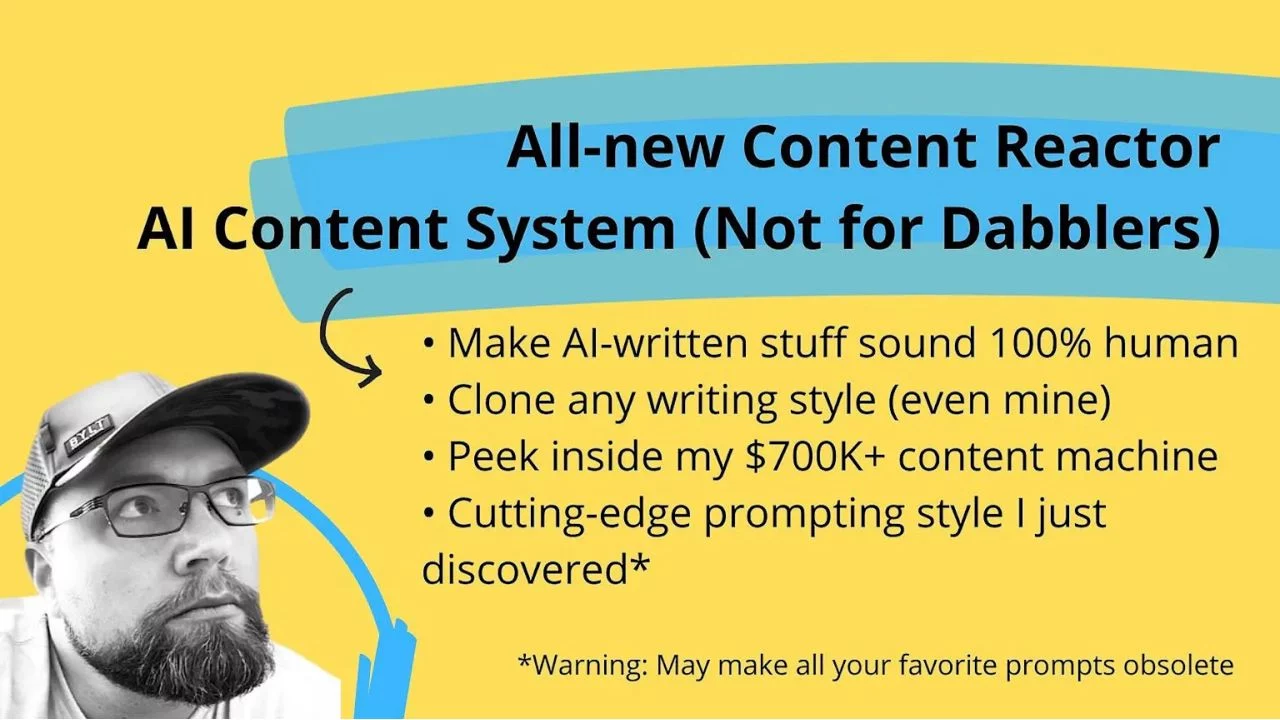
Rob Lennon AI Content Reactor 3.0 teaches a new way to write with AI that Rob Lennon built after another 1,000+ hours working with chat-class models. He describes the original AI Content Reactor as the course that started it all, and this version as three times as good, with all-new frameworks and prompting techniques updated in June/July 2024.
The core idea is to use AI as a co-writer that preserves your voice, not to replace it. You get over 90 minutes of short on-demand lessons, ready-made prompt templates to copy or customize, and an approach that, according to the author, beats the megaprompt style he pioneered: it adapts to any content type and captures writing style better. It is sophisticated but non-technical, so there are no training data models and no code.
The files are organized by week. Week 1 covers quick wins and your AI co-writer, Week 2 style and POV cloning with Writeprints and Exemplars, Week 3 bonus Make.com automation, editing and de-AI-ifying plus a case study, and Week 4 content planning with the Endless Inspiration Board. The course also ships cheat sheets, an Exemplar Builder spreadsheet and live training recordings. For more business and marketing programs, see our Ecommerce Courses category.
Course at a glance
| Author / school |
Rob Lennon |
| Format |
Digital files (self-paced) |
| Video lessons |
64 |
| Total files |
120 |
| Total size |
13.21 GB |
| Topic |
AI writing, prompting and content systems |
| Updated |
June/July 2024 |
| Contents |
64 videos, 120 files across 4 weeks and post-training |
| Payment |
Crypto only |
| Delivery |
Fast manual delivery after payment confirmation; links stay active for 7 days |
Mastery Program
Rob Lennon — AI Content Reactor 3.0
A four-week system for building an AI co-writer that sounds like you, with templates, live sessions and automations.
- Week 1: live kickoff, quick wins and your AI co-writer
- Week 2: Writeprints, Exemplars and step-by-step co-writer implementation
- Week 3: Make.com automation, Console and Playground exemplars, editing the AI, human and cyborg way
- Week 4: content planning, Endless Inspiration Board prompts and cheat sheets
Best for: writers, marketers and creators who want AI-assisted content that keeps their own voice.
What You Will Learn in Rob Lennon AI Content Reactor 3.0
- Set up an AI co-writer step by step
- Create a Writeprint to clone your style and point of view
- Build Exemplars with the Exemplar Builder template
- Automate content generation with Make.com
- Edit AI-written drafts three ways: AI, human and cyborg
- Plan content with the Endless Inspiration Board and wildcards
- Reuse cheat sheets for prompts and GPTs
Each lesson comes with a PDF so you can follow along, copy the prompts and rebuild the workflow in your own tools.
Course index — what is inside
120 files in 7 main sections · 64 videos · 13.21 GB
📂 01-Week 1 · 11 files
📂 1. Live Kickoff and Quick Wins · 2. Your AI Co-Writer (Part 1)
Live Kickoff and Quick Wins August 16th · Live Kickoff and Quick Wins Slides · 1. Ultra-quick intro · 1. Ultra-quick intro · 2. Big win incoming · 2. Big win incoming · 3. What is content, anyway · 3. What is content, anyway · 4. Same, but different, part 1 (and our first content!) · 4. What is content, anyway · 5. Your turn Co-writer part 1
📂 02-Week 2 · 35 files
📂 Live Training · Week 2 – Modules · 1. AI Interviews and Inspiration · 2. Style and POV Cloning (Part 1 Writeprints) · 3. Style and POV Cloning (Part 2 Exemplars) · 4. Your AI Co-Writer (Part 2 Step-By-Step Implementation)
1. First Steps to Custom Content · 2. AI Co-Writers Up and Running · 1. Where the best content concepts come from · 2. Content VA Interview Bot · 2. Content VA Interview bot · 3. Have a Chat · 1. Intro to Style and POV Cloing · 2. Writeprints – 1280×720 1500K · 3. Tweaking Your Writeprint (And what to look for) · 3. Tweaking Your Writeprint~ – 1280×720 1500K · 4. Adding writeprint to prompt – 1280×720 1500K · 4. Updating Your Content Prompt With Your Writeprint · 1. Fine Tuning On-The-Fly · 2. Intro to Exemplars (And fly beats) · 2. Intro to Exemplars And fly beats – 1280×720 1500K · 3. Defining Your Content Project · 3. Time to Define Your Project – 1280×720 1500K_2 · 4. Fake Fine Tune Data-Set Builder + Data Deconstructor GPT · 4.1 Exemplar Builder Template · 4.2 Cgpt · 1. Intro to Implementation – 1280×720 1500K · 2. Base Prompt – Basic Tweaks – 1280×720 1500K · 2. Step 1 Base Prompt – Basic Tweaks · 3. Generate and Insert Writeprint – 1280×720 1500K · 3. Step 2 Generate and Insert a Writeprint · 4. Choose Example Content Outputs – 1280×720 1500K · 4. Step 3 Choose Example Content Outputs · 5. Pair Inputs with Example Outputs – 1280×720 1500K · 5. Step 4 Pair Inputs with Example Outputs · 6. Copy Over Exemplars – 1280×720 1500K · 6. Step 5 Copy Over Exemplars · 7. Run Your Prompt – 1280×720 1500K · 7. Step 6 Run Your Prompt 🎉 · 8. i did it · 8. I did it – 1280×720 1500K
📂 03-Week 3 · 30 files
📂 Live Training · Week 3 Module · 1. BONUS Content Automation with Make.com (Part 1) · 2. BONUS Working with Exemplar Prompts in PlaygroundConsole · 3. Case Study Marketing Materials for The Tapping Solution · 4. Methods for Editing and De-AI-ifying
1. Live Q&A Content + Prompt Reviews · 2. Long Complex Content + Editing AI-Written Content · 1. Welcome to Content Automations – 1280×720 1500K · 1. Welcome · 2. Project Overview – 1280×720 1500K · 3. Make.com basics Set Variables & OpenAI-ChatGPT – 1280×720 1500K · 4. Build Explanation – 1280×720 1500K · 5. Variables 1-2 & Prompts 1-2 – 1280×720 1500K · 6. Adding the Content Generations Claude OpenAI – 1280×720 1500K · 7. Finishing Up Our Flow – 1280×720 1500K · 8. Blueprint · 8. Final Tweaks and Result – 1280×720 1500K · 9. How to import a Makecom blueprint – 1280×720 1500K · 1. Exemplars in Anthropic Console and OpenAI Playground (part 1) · 1. Working with Exemplars in Console _ Playground part 1 v2 – 1280×720 1500K · 2. OpenAI doesnt autosave prompts – 1280×720 1500K · 3. Prompt Experimentation in Playground-Console – 1280×720 1500K · 4. How to Re-compose Your Exemplars Megaprompt (part 3) · 4. Recompose Your Exemplars Megaprompt – 1280×720 1500K · Case Study_ Marketing Materials for The Tapping Solution – 1280×720 1500K · Prompt · 1. Intro to AI Editing – 1280×720 1500K · 2. Editing The AI way · 2. Editing the AI Way~ – 1280×720 1500K · 3. Editing the Human Way – 1280×720 1500K · 3. Editing, the Human Way · 4. Editing the Cyborg Way – 1280×720 1500K · 4. Editing, the Cyborg Way · 5. Quick Editing Wrap Up – 1280×720 1500K · 5. Quick Wrap Up Video
📂 04-Week 4 · 31 files
📂 Live Training · Live Training · Week 4 Module · 1. Content Planning Techniques, Eggs, and Wildcards · 2. Wrapping Up and Where to Next · 3. Content Reactor Prompts and GPTs Cheat Sheets
1. Content Planning, Ideation, and Variety with AI · 1. Content Planning, Ideation, and Variety with AI · 2. Live Q&A Content + Prompt Reviews Final Remarks · 1. Intro to Content Planning – 1280×720 1500K · 1. Intro to Content Planning · 2. The Endless Inspiration Board Method – 1280×720 1500K · 2. The Endless Inspiration Board Method · 2.1 Endless Inspiration Board Explanation~ – 1280×720 1500K · 3. Endless Inspiration Prompt 1 Audience Pillar Topics – 1280×720 1500K · 3. Endless Inspiration Prompt 1 · 4. Endless Inspiration Prompt 2 · 4. Endless Inspiration Prompt 2_ Pillars Subtopics – 1280×720 1500K · 5. Endless Inspiration Prompt 3 Subtopics Emotional Drivers – 1280×720 1500K · 5. Endless Inspiration Prompt 3 · 6. Wildcards – 1280×720 1500K · 6. Wildcards · 7. Bringing the Human Back Into Your AI Process – 1280×720 1500K · 7. Bringing the Human Back Into Your AI Process · 7.1 Thoughts on Growth Systems -_ Starting Simple – 1280×720 1500K · 8. Wrapping Up Content Planning – 1280×720 1500K · 8. Wrapping Up Content Planning · 1. Take 60s seconds to give a shout out – 1280×720 1500K · 2. Managing your new superpower – 1280×720 1500K · 2. Managing your new superpower · 1. Take 2 pieces of content and make a 3rd · 2. AI Content Assistant · 3. Writeprint Generator · 4. AI Co-Writer Implementation · 5. AI Editor Prompts · 6. Content Planning Endless Inspiration Board Prompts · 7. Article Co-Writer Base Prompt
📂 05-Post Training · 2 files
BONUS And Sample Project · Optional- Extra Session- Q A + Office Hours
📂 1. Live Kickoff and Quick Wins · 2 files
Live Kickoff and Quick Wins August 16th · Live Kickoff and Quick Wins Slides
📂 2. Your AI Co-Writer (Part 1) · 9 files
1. Ultra-quick intro · 1. Ultra-quick intro · 2. Big win incoming · 2. Big win incoming · 3. What is content, anyway · 3. What is content, anyway · 4. Same, but different, part 1 (and our first content!) · 4. What is content, anyway · 5. Your turn Co-writer part 1
Rob Lennon AI Content Reactor 3.0 vs. Collecting Free Prompt Tips
Prompt tips are everywhere, but a system is what makes AI content consistent.
| Factor |
Rob Lennon AI Content Reactor 3.0 |
Free prompt tips |
| Approach |
Writeprints and Exemplars, built step by step |
Single prompts, no method |
| Voice |
Designed to capture your writing style |
Generic output |
| Resources |
PDFs, cheat sheets, template spreadsheet |
Screenshots and threads |
| Automation |
Make.com bonus walkthrough |
Rarely shown end to end |
A repeatable workflow instead of a folder of random prompts.
How to get it
1
Choose your course
Review the contents above and confirm the program fits your goal.
2
Pay with crypto
Checkout is crypto only. No account or verification is needed — see the payment guides if you are new to crypto.
3
Fast manual delivery
Delivery is handled manually after payment confirmation, so you get your files quickly.
4
Download & save
Download links remain available for 7 days. Save everything to your own storage.
Digital files. Crypto payment only. Fast delivery is handled manually after payment confirmation. Download links remain available for 7 days; save your files locally.
A coupon is available for this course.
Open the coupons page and check the current offer before you pay.
SEE COUPONS →
✓ Pros
- Updated June/July 2024 for current chat-class models
- 64 videos plus PDFs, slides, prompts and a spreadsheet
- Non-technical: no code or training data models needed
- Includes live trainings, a case study and automation bonus
✗ Cons
- Multi-gigabyte download with a lot of files to organize
- Some weeks repeat folders, such as the kickoff in post-training
- Self-paced recordings, no live access to the author
- Crypto-only payment
Frequently asked questions
q
a
q
a
q
a
How do I pay for this course?
Payment is by cryptocurrency only. No account or verification is needed, and the site explains the process step by step on its payment guide:
how to pay.
How is the course delivered?
These are digital files. Delivery is handled manually after payment confirmation. Download links remain available for 7 days, so save your files locally.




Reviews
There are no reviews yet.