
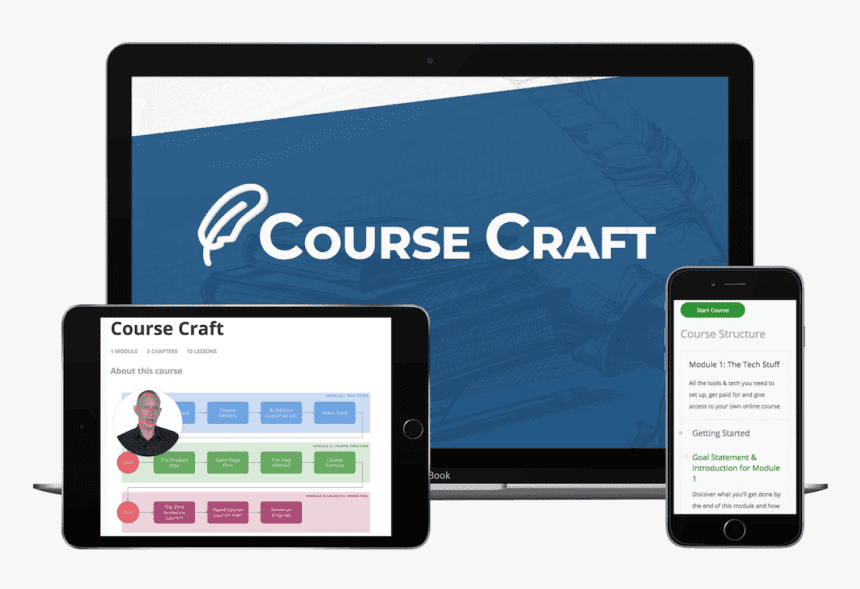
Shane Melaugh Course Craft: from course idea to first launch
Shane Melaugh Course Craft equips aspiring course creators to develop and sell educational content, and is organised in three modules. Module 1, The Tech Stuff, covers getting paid, a separate website for your course, Thrive Apprentice and SendOwl setup, email marketing integration, a Facebook retargeting pixel bonus and an end-to-end test, plus chapters on video tools, lighting and background setups.
Module 2, Magnetic Course Creation, is the creative core. It covers what can and cannot be sold for $200, customer development, Competition Judo, the EPOC method, the Map Method and a sales-page-first approach, then course structure, the Bento Box method, the four types of video lesson, slides, scripts and recording. Module 3, Magnetic Course Marketing, covers the zero audience launch strategy, launch plan and email marketing, the free line, revenue engines, evergreen marketing, the Story Worth Telling strategy, content marketing and affiliates.
The archive has 47 lessons, each with a PDF companion. To explore other creator resources, visit the Ecommerce category, the cheap ecommerce courses list and the updates page. Related options include Joseph Michael Easy Course Creation and the Grace Lever Course Creation Project. A coupon page is available.
At a glance
| At a glance | Course Craft |
|---|---|
| Course | Shane Melaugh – Course Craft |
| Author | Shane Melaugh |
| Format | Digital files (instant-access download, no subscription) |
| Video lessons | 47 |
| Files in total | 94 |
| Total size | 3.2 GB |
| Topic | Creating and marketing online courses |
| Structure | Three modules with chapters |
| Tools covered | Thrive Apprentice, SendOwl, email marketing integration |
| Format | 47 lessons as video files (.ts) with PDF guides |
| Delivery | Manual delivery after crypto payment confirmation |
What you learn in Course Craft
- How to get paid and deliver a course on your own website
- How to set up Thrive Apprentice and SendOwl, connect email and a Facebook retargeting pixel, and test the whole flow
- How to choose video gear, lighting and a non-studio background
- How to judge what can be sold and validate an idea through customer development
- How the EPOC method and Competition Judo make your product valuable
- How to use the Map Method and the five components of a high-value course
- How to write the sales page before the product and add a rapid sales video
- How to plan, script, record, edit and publish video lessons
- How to run a zero audience launch with a launch plan and email marketing
- How evergreen, content and affiliate marketing keep sales going
Shane Melaugh – Course Craft
Shane Melaugh Course Craft teaches you to create and market an online course in three modules: tech setup, magnetic course creation and magnetic course marketing. It includes 47 lessons with PDFs, covering sales pages, video lessons and zero-audience launches.
- 📁 Chapter 1 Getting Started
- 1 – Goal Statement & Introduction for Module 1
- 2 – Do You Need to Use the Tools Recommended in Course Craft
- 📁 Chapter 2 Payment Processing & Course Delivery
- 1 – Getting Paid
- 2 – Separate Website for Your Course
- 3 – Setting Up Thrive Apprentice & SendOwl
- 4 – The 3 Core Pages & Thrive Apprentice Course Setup
- 5 – SendOwl Settings & Email Marketing Integration
- 6 – Bonus Installing a Facebook Retargeting Pixel
- 7 – The End-to-End Test
- 📁 Chapter 3 Video Course Creation Tools
- 1 – How to Choose the Right Video Tools
- 2 – Gear & Software for Creating Video Lessons
- 3 – The Best Budget Lighting Setup (and Why It Matters So Much)
- 4 – Advanced Video Lighting Setup
- 5 – The Non-Studio Background Setup
- 6 – Higher Budget Video Gear Recommendations
- 1 – Module 2 Goal Statement
- 2 – Tools to Develop Your Course Idea & Outline
- 📁 Chapter 1 Value & Idea Validation
- 1 – What Can & Can’t Be Sold for $200 – Part 1
- 2 – What Can & Can’t Be Sold for $200 – Part 2
- 3 – Idea Validation on Steroids Customer Development
- 4 – Competition Judo
- 5 – The EPOC Method How to Make Your Product Uniquely Valuable
- 📁 Chapter 2 The Map Method
- 1 – The Tour Guide Story
- 2 – How to Create & Develop Your Course Map
- 📁 Chapter 3 The Sales Page First Approach
- 1 – Why You Should Create Your Sales Page Before You Create Your Product
- 2 – Bonus The Visual Design Shortcut
- 3 – How to Create a Kick-Ass Sales Page, Part 1
- 4 – How to Create a Kick-Ass Sales Page, Part 2
- 5 – Bonus My Process for Creating a Rapid Sales Video
- 📁 Chapter 4 Course Content & Structure
- 1 – The 5 Components of a High Value Course
- 2 – 2 Frameworks for Creating Your Course Structure
- 3 – Course Structure in Thrive Apprentice
- 📁 Chapter 5 How to Create Awesome Video Lessons
- 1 – Clarity The Bento Box Method
- 2 – The 4 Types of Video Lesson
- 3 – How to Create Excellent Presentation Slides
- 4 – How to Present on Video (Scripts Teleprompters)
- 5 – How to Record, Edit & Publish Your Video Lessons
- 1 – Module 3 Goal Statement
- 📁 Chapter 1 Product Launch
- 1 – The Zero Audience Launch Strategy, Part 1
- 2 – The Zero Audience Product Launch, Part 2
- 3 – Launch Plan & Email Marketing
- 📁 Chapter 2 Revenue Engines & the Online Course Business Funnel
- 1 – The Free Line Demystified
- 2 – Revenue Engines How to Upgrade Your Funnel
- 📁 Chapter 3 The Marketing Strategy
- 1 – The 3 Keys to Successful Evergreen Course Marketing
- 2 – The “Story Worth Telling” Marketing Strategy
- 3 – Content Marketing for Course Creators
- 4 – The Ongoing Affiliate Marketing Strategy
Course Craft vs other course creation programs
All of these help you create courses. Course Craft stands out for its tool setup, sales-page-first method and zero audience launch.
| Course | Focus | Best for |
|---|---|---|
| Course Craft | Course creation, tech setup and launch | Creators starting from zero |
| Joseph Michael Easy Course Creation | Easy course creation | Creators who want a simple process |
| Grace Lever The Course Creation Project | Course creation project | Creators who like a project format |
| Grace Lever Course Creation Project v2.0 | Updated course creation project | Creators wanting the newer version |
Who should take Course Craft
- Experts who want to turn what they know into a paid course
- Aspiring course creators who want to build engaging educational content
- Creators with no audience who need a launch plan
- Newcomers who need help choosing tools, payment processing and video gear
- Marketers who want evergreen, story-based and content marketing for a course
- Covers the full path: tools, creation and marketing
- 47 lessons, each with a PDF companion
- Sales-page-first approach that tests demand early
- Practical video, lighting and recording guidance
- Zero audience launch strategy
- Self-paced digital files with no live support
- Requires real work: recording, writing and launching
- Tools shown, such as Thrive Apprentice and SendOwl, may change over time
- Content is in English
Shane Melaugh Course Craft FAQ
What is Course Craft?
It is a three-module program on creating and marketing an online course: tech setup, magnetic course creation and magnetic course marketing.
Do I need an audience?
No. A full chapter covers the zero audience launch strategy, with a launch plan and email marketing for your first sales.
Does it teach video recording?
Yes. It covers video tools, lighting, non-studio backgrounds, scripts, teleprompters, slides, recording, editing and publishing.
What format are the files?
The archive has 47 lessons, each with a video tutorial in .ts format and a PDF guide.
Does it guarantee sales?
No. It teaches a method. Results depend on your idea, your execution and your marketing.
Course Craft is a practical guide for anyone who wants to launch a course without guesswork. It covers the tech, the idea, the sales page, the video lessons and the launch, in an order that lets you test demand before you invest months in production.
Get the files at Courses On Budget, check the available coupon and start with Module 1 today. Buy it, validate your idea first and then build.
Digital files. Crypto payment only. Fast delivery is handled manually after payment confirmation. Download links remain available for 7 days; save your files locally.
Browse the category: Courses On Budget · Ecommerce courses · Ecommerce Courses Cheap list · Latest updates · Coupons
Recommended course stack:

Reviews
There are no reviews yet.