

ROB LENNON N8n course — Index Review: The Short Version
The short version of this Rob Lennon n8n Course index review: it is a compact, build-along introduction to n8n, the workflow automation tool. You begin with a cloud or self-hosted install, learn the interface, flow order and triggers, build two first workflows, then study data types, JSON and core nodes before moving to AI nodes, agents, Tavily, Apify, Google credentials, OpenRouter, Airtable and in-line code.
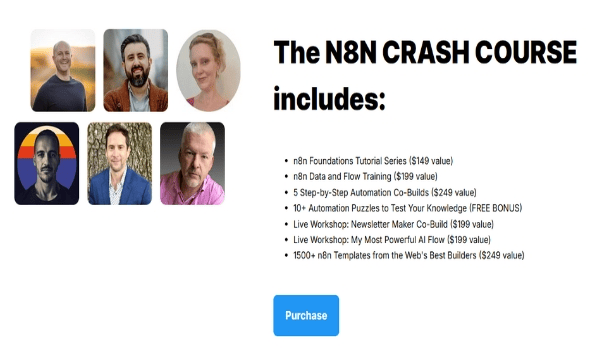
This Rob Lennon n8n Course index review should be clear that it is not a full agency or business-model program, and it says little about selling automation. What it does well is teach the tool itself in a sensible order, with real workflows to copy. The course page lists 12 workflow JSON files, 7 DOCX documents and 5 code files. Two sections, On-Demand Co-Builds and Wrapping Up, are marked as coming soon in the source index, so judge the course on what is already there.
| Quick facts | |
|---|---|
| Format | Twenty-three recorded videos in five sections with downloadable workflows |
| Main topics | n8n install, JSON, flow nodes, AI agents, Tavily, Apify, Airtable, troubleshooting |
| Extras | 12 workflow JSON files, 7 DOCX documents, 5 code files |
| Delivery | Fast delivery after checkout, one-time purchase, no subscription |
| Full index | See the full Rob Lennon n8n Course video index for every lesson title |
| Coupon | Available, details in the FAQ below |
What Is Inside Rob Lennon n8n Course: Content Overview
To avoid repeating the whole list, this Rob Lennon n8n Course index review groups the lessons by the skill they build. The exact lesson-by-lesson list stays on the Rob Lennon n8n Course course page, and every quote below is taken word for word from the course transcripts.
Installing n8n: cloud or self-hosted
The course opens with a welcome video and then two installation routes: n8n Cloud and a self-install on Hostinger. The instructor explains why the cloud route is the easier starting point, then shows the hosted alternative for people who want more control. A tour of the interface follows, covering data tables and the paid features you will not use much. It is a low-friction start, and the update lesson later covers keeping it current. It removes the setup problems which often stop beginners before their first workflow runs.
“And to be honest, if I were starting over, this is actually probably where I would consider going, because it’s just so easy.”
— from the video “n8n Cloud Install”
Flow order, triggers and two first workflows
Next come the basics of flow order and triggers, then two hands-on builds: a What a Company Does workflow and a Cal.com auto-responder. These examples are useful because they show how a trigger starts a run, how data moves between nodes and how small errors surface. The lesson on triggers explains the manual trigger that makes testing easy. You finish this block with two complete flows you can open, run and modify, which is a much better start than reading node documentation, and the files give you something to compare against when your own version misbehaves.
“And the most common one that you use when you’re building is the when clicking execute workflow, because that makes it really easy to test things.”
— from the video “n8n Basics – Flow Order Triggers”
Foundational concepts: data, JSON and flow nodes
Three lessons build the foundations: data types and JSON, the flow nodes If, Filter, Loop Over Items and Merge, and tips for handling multiple items with Limit, Aggregate and Split. These are the ideas that make later workflows less confusing. The instructor shows how a string can be turned into usable JSON with an Edit Fields node and explains referencing items in a list. Not glamorous, but this is where most self-taught users get stuck, so it earns its place, and the multiple-item tips will save you from several confusing errors later on.
“So if I want to turn this string into actual JSON, there’s a way to do it, and you can do it with an Edit Fields node, and it’s actually quite simple.”
— from the video “Data Types & JSON”
AI nodes and agents with Tavily
The integration section starts with AI nodes, then a workflow that finds what a company does and its recent news with Tavily, and a simple AI agent with a Tavily tool. Importantly, the agent lesson is sceptical rather than hyped. It treats agents as one option among several and points out that simpler workflows are often easier to manage. That balanced view helps you choose a tool deliberately instead of using an agent everywhere because it sounds modern, and the Tavily example still shows how a search tool plugs into an agent.
“I think that there’s a lot of hype around them and that they actually make things that are relatively simple and straightforward more complicated.”
— from the video “AI Agent + Tool (Simple AI Agent with Tavily Tool Demo)”
Apps and models: Apify, Google, OpenRouter, Airtable
Further lessons introduce Apify for web searching and scraping, the extra steps for Google credentials for Drive, Docs and Sheets, and OpenRouter for choosing between AI models, including cheaper open source ones. Airtable follows, with records that an agent can see and act on, and a final lesson on expressions and in-line code. Each lesson adds one connection you can reuse, and the OpenRouter video is a practical look at cost control when you run many automated tasks, and the lesson on Google credentials is worth following slowly because that setup has several easy-to-miss steps.
“And for many tasks, it’s quite good and perfectly acceptable, really not like a downgrade in any way.”
— from the video “OpenRouter (Use any AI model, including cheaper open source)”
Workshops, troubleshooting and upkeep
Two live workshop replays, a Newsletter Maker co-build and My Most Powerful AI Flow, show the tool used at a realistic pace. Three troubleshooting lessons follow in the last section: a common workflow error message, letting multiple nodes flow into the same place and updating a self-install. The error lesson is especially useful, because the instructor explains the problem in advance instead of leaving you to search forums when a workflow first fails, and the update lesson keeps a self-hosted install healthy afterward.
“but I wanted to make a little lesson for you because you’re going to hit this error”
— from the video “There was a problem executing the workflow The workflow has issues”
Seen together, the Rob Lennon n8n Course index review describes a clean ladder: install, learn triggers, master data, add AI, connect apps and then troubleshoot. Each section prepares the next one. For exact lesson titles and order, open the full Rob Lennon n8n Course video index.
Who Should Buy Rob Lennon n8n Course?
Our Rob Lennon n8n Course index review finds that this course suits marketers, freelancers and business owners who want a clear and quick start with n8n and AI automation without prior experience. If you have tried to read the documentation and felt lost, a structured path with working examples can save days. It is also useful if you already use another automation tool and want to see how the same ideas look in n8n.
Skip it if
you want a business-building program, client acquisition or an advanced engineering curriculum. The course concentrates on the tool, two sections are still marked as coming soon, and integrations or interfaces can change over time. You will also need your own accounts for services like Airtable, Google and the AI providers shown.
Rob Lennon n8n Course vs Other Ways to Learn
Documentation and forum threads can teach n8n too. The comparison below focuses on the order and practice the course provides.
| What matters | Free videos & blog posts | Rob Lennon n8n Course |
|---|---|---|
| Learning order | Looking up one node at a time | Install, triggers, data, AI, apps, troubleshooting |
| Hands-on examples | Short snippets with no context | Two first workflows and live workshop replays |
| Data handling | Learned the hard way from errors | Dedicated JSON, data types and multiple-item lessons |
| AI model choice | Scattered opinions on each provider | AI nodes, agent lesson and an OpenRouter video |
| Reusable files | Copying from blog screenshots | 12 workflow JSON files and 5 code files |
The edge highlighted in this Rob Lennon n8n Course index review is sequence plus practice. Reference material tells you what a node does, while this course shows when to use it, and you can scan the full Rob Lennon n8n Course video index to see that order.
Rob Lennon n8n Course Pros and Cons
- Clear path from install to AI agents
- Ready-to-import workflow files
- Honest, balanced view of AI agents
- Live workshops and troubleshooting lessons
- Two sections are still marked coming soon
- Focused on n8n, with no wider business training
- Integrations and interfaces change over time
Related Courses to Compare
After this Rob Lennon n8n Course index review, compare it with Rob Lennon – AI Content Reactor 3.0, Rob Lennon – AI Lead Magnets Workshop and Rob Lennon – Zero to 10K Twitter Accelerator. For more automation learning, see Kyle Herbel – CortexTools (AI Infrastructure with n8n), Lead Gen Jay – AI Automation Insiders (April 2026 Update) and Derek Pierce – Unleashed The Clones, or browse the full AI courses cheap list of AI courses.
How to Get Rob Lennon n8n Course With Fast Delivery
Rob Lennon n8n Course Index Review FAQ
How many videos are in the n8n course?
It contains 23 videos across five sections: intro to n8n, foundational concepts, integrating apps, AI and code, live workshops, and troubleshooting. The full Rob Lennon n8n Course video index lists each title.
Is the Rob Lennon n8n Course index review right for beginners?
Yes. The course starts with installation, the interface and simple workflows, and it is described for people with no prior automation experience.
Where can I find a coupon for the Rob Lennon n8n Course?
A coupon exists. Open the coupons page to find it and apply it at checkout.
How is the course delivered?
Fast delivery after checkout, as a one-time purchase with no subscription. See how to pay on site if you need help paying with crypto.
Final Verdict
Our Rob Lennon n8n Course index review ends on a clear note: it is a fast, practical way to become productive in n8n. It teaches installation, data handling, AI agents and integrations in a sensible order, and it is honest about which parts are still marked coming soon.
If that fits your plan, get it on Courses On Budget, use the coupon from the coupons page, and check the course updates page for new automation courses.
