

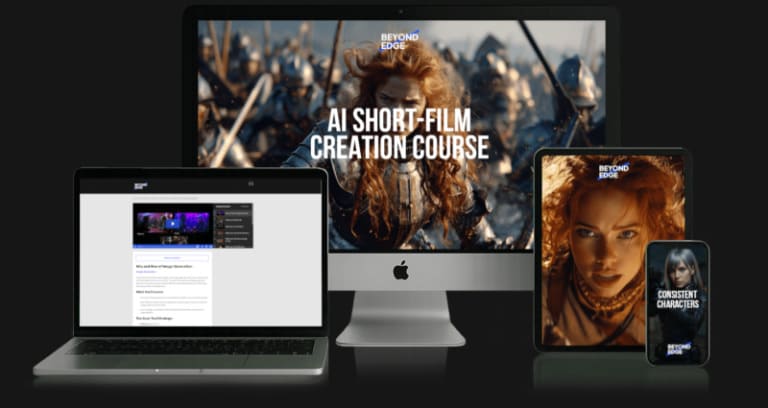
BeyondEdge AI Short-Film Creation — A start-to-finish AI filmmaking curriculum covering concept development, scriptwriting, shot lists, image generation, AI video, upscaling, audio, lip-sync and CapCut post-production. Browse more verified training through AI Courses Cheap or return to Courses On Budget. Check the current 5050 offer on the coupons page.
BeyondEdge AI Short-Film Creation: What You Actually Get
BeyondEdge AI Short-Film Creation follows the production pipeline instead of teaching disconnected tools. Across 71 files and 3.69 GB, the archive starts with concept development and scriptwriting, moves through image generation and shot consistency, then covers video generation, upscaling, voices, music, lip-sync and final editing. The structure ends with a complete short-film workflow, making the sequence easy to understand before you buy.

Why BeyondEdge AI Short-Film Creation Is Worth Reviewing
- Develop a short-film concept, AI-oriented script and practical shot list before generation begins.
- Study Midjourney prompting, consistent characters, style references, moodboards and editing, plus OpenAI image generation.
- Generate video with Kling, Runway, Google Flow VEO3 and Midjourney Video.
- Upscale generated video with Topaz Astra.
- Create voices and sound effects with ElevenLabs, music with Suno and lip-sync with HeyGen.
- Assemble the material in CapCut and review a complete workflow for The One Truth short film.
AI Short-Film Production Pipeline
| Production stage | Lessons/tools in the archive | Purpose |
|---|---|---|
| Pre-production | Concept, scriptwriting, shot list | Plan a film that AI tools can execute. |
| Image generation | Midjourney, OpenAI image generation, upscaling | Create visual frames and consistent assets. |
| Video generation | Kling, Runway, VEO3, Midjourney Video | Turn still concepts into moving shots. |
| Video enhancement | Topaz Astra | Improve generated footage before editing. |
| Audio | ElevenLabs, Suno | Create voices, effects and music. |
| Lip-sync | HeyGen | Synchronize generated characters with dialogue. |
| Post-production | CapCut | Assemble, edit and finish the film. |
Who Should Choose BeyondEdge AI Short-Film Creation?
- Creators who want one workflow spanning AI pre-production through final edit.
- Filmmakers experimenting with image-to-video and text-to-video tools.
- Social and branded-content creators who need consistent characters, shots, voices and music.
- Learners who want both video lessons and paired PDF/workbook material.
Pros & Considerations
- Clear production-stage structure from concept to completed workflow.
- 34 videos plus 35 PDFs and 2 DOCX files provide both instruction and supporting material.
- Covers image, video, audio, lip-sync and editing instead of one isolated generation tool.
- The archive spans several third-party AI platforms, and their separate access is not shown as included.
- The course is specifically focused on short-film creation rather than general AI content production.
Full Course Structure — BeyondEdge – AI Short-Film Creation
| ▶ |
See a real lesson from this course
Unedited sample from the actual files. No login, no signup.
|
📂 01-Intro to AI Short-Film Creation (2 files)
📂 02-Pre-production (11 files)
📂 03-AI Production (2 files)
📂 04-Image Generation (24 files)
📂 05-Video Generation (14 files)
📂 06-Video Upscaling (2 files)
📂 07-Audio Generation (8 files)
📂 08-LipSync (2 files)
📂 09-Post-production (2 files)
📂 10-Complete Workflows (2 files)
📂 11-Closure (2 files)
Related AI Courses on Courses On Budget
Build a stronger learning path with related products from the same catalog:
Benjamin Benichou – Masters of AI
Tommy T – AI Video Academy
Yury Yeltsov – Video Creation by Using Artificial Intelligence
Final Verdict
BeyondEdge AI Short-Film Creation is a strong fit when the buying question is not “which AI video tool?” but “how do I move from an idea to a finished AI short film?” The archive answers that with a production sequence: pre-production, image generation, video, enhancement, audio, lip-sync and editing.
For the current product listing, fast delivery and checkout details, use the official BeyondEdge – AI Short-Film Creation product page on Courses On Budget.
Official tool/resource reference: Runway.


Reviews
There are no reviews yet.