

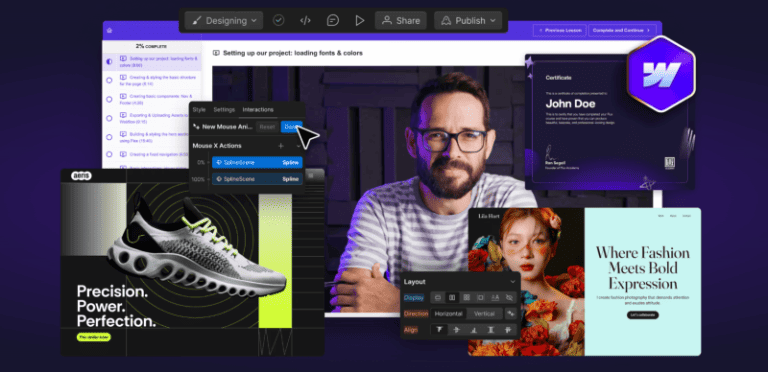
Ran Segall – Webflow Masterclass 5.1 Pro is presented here from the verified course structure and the current product information — without inventing modules, bonuses or outcomes. Browse more premium training on Courses On Budget.
Ran Segall Webflow Masterclass 5.1 Pro — What This Course Actually Covers
A large project-based Webflow curriculum combining updated Webflow foundations, creative development, CMS systems, frameworks, certification work, bonus builds and professional client/agency material.
Instead of selling the course with vague hype, this page shows the curriculum itself. That makes it easier to decide whether the training matches your current skill level and goals before you buy. Use coupon code 5050 at checkout for the current extra 50% offer shown on Courses On Budget.
What You Get
- Three full Webflow projects are stated on the current product page
- 8-week private mentoring is stated on the current product page
- Webflow concepts, responsive layouts, CMS, interactions and animations
- Client-First, Relume, Finsweet, Airtable/CMS Bridge, Zapier and component workflows appear in the index
- Certification project plus bonus Yoga Studio and sport-events membership builds
Structured Course vs. Random Tutorial Hopping
The useful comparison is not a fake claim that one course is “better than everything.” It is whether you want one indexed path or disconnected resources:
| Learning route | What you get | Best use |
|---|---|---|
| Ran Segall – Webflow Masterclass 5.1 Pro | Structured curriculum with the indexed lessons and resources listed below. | Following one coherent course path. |
| Scattered free tutorials | Separate videos and articles chosen one by one. | Filling a specific knowledge gap. |
Complete Ran Segall Webflow Masterclass 5.1 Pro Course Index
Open each section to inspect the verified lesson and resource structure. Large modules are collapsed by default so the product page remains readable on desktop and mobile.
01 – Webflow Masterclass 5.0 Pro: Working With Clients / Career
- 01-Introduction Process Overview.mp4 (45.47 MB)
- 01-Introduction Process Overview.pdf (15.16 KB)
- 02-Effective Project Management Notion Template Starter Project Communication Feedback.mp4 (655.29 MB)
- 02-Effective Project Management.pdf (18.38 KB)
- 03-Ultimate Webflow Build Checklist.mp4 (950.53 MB)
- 03-Ultimate Webflow Build Checklist.pdf (15.22 KB)
- 04-Pricing Proposals Closing Deals.mp4 (747.94 MB)
- 04-Pricing Proposals Closing Deals.pdf (15.82 KB)
- 04-Flow Gurus – QUOTE TEMPLATE v1.0 COMMUNITY COPY.xlsx (99.65 KB)
- 05-Onboarding Managing Client Expectations.mp4 (451.86 MB)
- 06-Lesson 6 Correcting Skintones.mp4 (1.10 GB)
- 06-Transferring Project Smooth Launches.mp4 (461.31 MB)
- 06-Transferring Project Smooth Launches.pdf (11.35 KB)
- 07-3D Globe interaction.mp4 (10.48 MB)
- 07-Client Training Handover Example videos.mp4 (320.67 MB)
- 07-Customer reviews CMS slider.mp4 (38.49 MB)
- 07-Heading text icon images.mp4 (7.33 MB)
- 07-HiThrive update pricing.mp4 (8.12 MB)
- 07-How to Add a New Progress or Update Article.mp4 (56.11 MB)
- 07-How to Update Resources.mp4 (12.55 MB)
- 07-June Lake – Welcome to Webflow.mp4 (96.77 MB)
- 07-Supreme Skips – Updating-changing prices.mp4 (13.73 MB)
- 07-Wedgetail – Upload blog post.mp4 (54.43 MB)
- 08-Finding Retaining New Clients.mp4 (986.17 MB)
- 09-Becoming a Webflow Expert.mp4 (407.50 MB)
- 09-Becoming a Webflow Expert.pdf (11.09 KB)
- 10-Scaling into a Webflow Agency.mp4 (594.46 MB)
01 – Webflow Masterclass 5.0 Pro: Working Together With Team Members
- 01-Creating Managing Team Accounts.mp4 (820.40 MB)
- 02-Establishing a Collaborative Workflow for Designers and Developers.mp4 (774.63 MB)
- 02-Establishing a Collaborative Workflow for Designers and Developers.pdf (10.90 KB)
- 02-Flow Gurus – Webflow Starter Kit.pdf (9.63 MB)
- 03-Styling Structuring Considerations for Teams.mp4 (1.03 GB)
- 04-Team Project Management Organization.mp4 (816.55 MB)
- 01-Conclusion Whats Next.mp4 (44.50 MB)
01 – Webflow Masterclass 5.0 Pro: Ultimate Webflow Build Checklist
- 01-Introduction.mp4 (84.46 MB)
- 02-Getting Started.mp4 (24.23 MB)
- 03-Values and Principles.mp4 (152.09 MB)
- 04-Client Onboarding.mp4 (180.12 MB)
- 06-Review design.mp4 (583.73 MB)
- 07-Plan fonts colors spacing.mp4 (70.31 MB)
- 08-Export Figma assets.mp4 (136.36 MB)
- 09-301 redirects and URL map.mp4 (279.40 MB)
- 09-301 redirects and URL map.pdf (11.09 KB)
- 10-Create Webflow account.mp4 (41.18 MB)
- 11-Create Webflow project.mp4 (665.52 MB)
- 12-Create MarkUp and Loom links.mp4 (18.53 MB)
- 13-Import Figma assets.mp4 (28.69 MB)
- 14-Set up ALL pages.mp4 (137.10 MB)
- 15-Import Relume components.mp4 (370.68 MB)
- 16-Style guide setup.mp4 (313.67 MB)
- 17-Nav and footer links.mp4 (50.48 MB)
- 18-Create DONE DONE DONE.mp4 (75.49 MB)
- 19-Build easy.mp4 (271.93 MB)
- 20-Build tricky.mp4 (234.75 MB)
- 21-Technical SEO.mp4 (72.16 MB)
- 22-Integrations and automations.mp4 (66.36 MB)
- 23-Make it sexy.mp4 (159.32 MB)
- 24-Clean up.mp4 (387.49 MB)
- 25-Flow Gurus audit.mp4 (1.46 GB)
- 26-MarkUp tweaks Client Review.mp4 (154.83 MB)
- 27-Transfer.mp4 (529.27 MB)
- 28-Set up hosting.mp4 (88.48 MB)
- 29-Add 301 redirects.mp4 (86.94 MB)
- 30-Pre-launch checks.mp4 (124.12 MB)
- 31-Go live.mp4 (515.77 MB)
- 32-Post-live testing.mp4 (94.36 MB)
- 33-Handover.mp4 (606.24 MB)
- 34-Post-live tweaks.mp4 (202.03 MB)
- 35-Customer feedback.mp4 (66.46 MB)
- 36-Compile case study promote.mp4 (283.73 MB)
- 37-30 day review.mp4 (128.25 MB)
- 38-Review and improve.mp4 (61.66 MB)
- Bonus – How to automate customer feedback.mp4 (136.36 MB)
- Bonus – How to automate customer feedback.pdf (10.60 KB)
02 – Webflow Masterclass 5.1: Introduction
- 01-Welcome How to Succeed in This Program.mp4 (256.67 MB)
- 01-Welcome How to Succeed in This Program.pdf (20.99 KB)
- 02-What Webflow subscription you need for this course.mp4 (128.46 MB)
- 02-What Webflow subscription you need for this course.pdf (29.43 KB)
- 03-Introduction to Webflow UI UI Updates.mp4 (237.26 MB)
- 03-Introduction to Webflow UI UI Updates.pdf (18.83 KB)
- 03-How to send us a sandbox link aka the old read-only link – 24 Octo.mp4 (13.16 MB)
- 04-How does mentoring work.pdf (43.09 KB)
02 – Web Design Concepts You MUST Understand
- 01-What is HTMLCSS.mp4 (258.94 MB)
- 01-What is HTML-CSS.pdf (13.74 KB)
- 02-How Content Flows on the Web.mp4 (104.12 MB)
- 03-The Box Model.mp4 (109.29 MB)
- 04-Nesting Cascading.mp4 (199.06 MB)
- 04-Webflow Beginner Series 4 – The Cascading Down Principle.mp4 (206.24 MB)
- 05-How Styling Works Global Classes Combo Classes HTML Tags.mp4 (295.37 MB)
- 06-How to use Flex AKA Auto-Layout.mp4 (185.03 MB)
- 06-How to use Flex AKA Auto-Layout.pdf (20.99 KB)
- 06-Flexbox Horizontal Masonry Layout in Webflow No Code Tutorial Fully Responsive Accessible.mp4 (784.51 MB)
- 06-Webflow Flexbox Design Patterns.mp4 (519.63 MB)
- 07-Webflow Beginner Series 2 – Sections Containers Div Blocks Debunked.mp4 (178.25 MB)
- 07-Why we use wrappers.mp4 (106.82 MB)
- 08-The Right Structure for EVERY Page.mp4 (214.68 MB)
- 09-Measurements Pixels VWVH EMREM.mp4 (219.36 MB)
- 10-What are variables Flux Academy.mp4 (120.45 MB)
02 – Building Strong Foundations
- 01-Assets for this module.pdf (25.86 KB)
- 01-Prtfolio-assets.zip (59.93 MB)
- 01-WFM5 – Level 1 – CMS Content.docx (7.98 KB)
- 01-WFM5 Fundations STUDENTS.pdf (36.10 MB)
- 02-Setting up our project loading fonts colors.mp4 (313.92 MB)
- 02-Webflows Workspace Plans Explained To My Hypothetical 10-year-old Daughter.mp4 (180.99 MB)
- 03-Creating styling the basic structure for the page.mp4 (312.81 MB)
- 04-Creating basic components Nav Footer.mp4 (160.04 MB)
- 05-Exporting Uploading Assets to Webflow.mp4 (352.82 MB)
- 05-Exporting Uploading Assets to Webflow.pdf (22.08 KB)
- 06-Building styling the hero section using Flex.mp4 (609.72 MB)
- 07-Creating a fixed navigation.mp4 (279.35 MB)
- 08-Basic interactions Hover states.mp4 (271.84 MB)
- 09-Creating a bento design using Grid Utility Classses.mp4 (738.34 MB)
- 09-Webflows Navbar Mega Menu – Ep 1 Desktop Structure Hover Interactions No Code Tutorial.mp4 (1.06 GB)
- 10-Understanding Webflows CMS.mp4 (285.37 MB)
- 11-Setting up a basic CMS Projects collections.mp4 (486.99 MB)
- 12-Creating the projects section using the Collection list.mp4 (604.98 MB)
- 12-Creating the projects section using the Collection list.pdf (17.61 KB)
- 13-Advanced Styling Even CMS Item Flip using Flex.mp4 (196.59 MB)
- 14-Creating a static page template.mp4 (100.77 MB)
- 15-CSS Positioning in Webflow Everything You Need to Know.mp4 (1.30 GB)
- 15-Intro to Position Absolute.mp4 (66.37 MB)
- 16-Projects Page – Projects Page Overlays.mp4 (802.49 MB)
- 17-Project case study using the collection page.mp4 (570.68 MB)
- 18-Creating a sticky element.mp4 (124.30 MB)
- 18-Webflow Beginner Series 1 – Sticky vs Overflow.mp4 (118.28 MB)
- 19-Creating a testimonial slider.mp4 (499.02 MB)
- 20-Working with backgrounds.mp4 (105.23 MB)
- 21-Creating the About page.mp4 (313.66 MB)
- 22-Creating Using forms.mp4 (325.24 MB)
- 22-Finsweet Mirror Input Values – Create Real-Time Dynamic Inputs in Webflow Tutorial.mp4 (593.23 MB)
- 23-Dropdowns Open Automatically On Load Scroll Or Link Click Webflow Tutorial.mp4 (718.70 MB)
- 23-How To Deal With Webflow Animations.mp4 (416.73 MB)
- 23-Intro to Interactions Creating an Accordion for the FAQ.mp4 (720.05 MB)
- 24-Creating component variations nav footer button.mp4 (498.75 MB)
- 25-Four Techniques for Scrolling Animations.mp4 (600.19 MB)
- 25-4 Logo And Text Webflow Scroll Animations You Can Create Without Code Tutorial.mp4 (726.78 MB)
- 26-Disable Page Scrolling in Webflow Without JavaScript Just One CSS Rule Tutorial.mp4 (154.30 MB)
- 26-Making the Website Responsive Flux Academy.mp4 (1.14 GB)
- 27-Mobile Navigation.mp4 (427.92 MB)
- 28-Adding Custom code to refine the font using ChatGPTw.mp4 (229.28 MB)
- 28-Adding Custom code to refine the font using ChatGPT.pdf (20.87 KB)
- 29-Understanding Accessibility in Webflow.mp4 (426.99 MB)
- 30-Privacy Considerations.mp4 (403.40 MB)
- 30-Privacy Considerations.pdf (17.64 KB)
- 31-SEO Basics in Webflow.mp4 (314.60 MB)
- 31-SEO Basics in Webflow.pdf (17.30 KB)
- 32-Final sets publishing hosting client handover.mp4 (398.70 MB)
- 33-Conclusion Skill Verification.mp4 (23.69 MB)
02 – Creative Development: Building Award-Winning Websites
- 01-Aeris assets.zip (15.25 MB)
- 01-Assets for this module.pdf (20.17 KB)
- 01-WFM5 – Creative Dev STUDENTS.pdf (5.84 MB)
- 02-Intro to Animation Types.mp4 (147.78 MB)
- 02-Intro to Animation Types.pdf (13.51 KB)
- 03-Reviewing design assets planning the build.mp4 (119.79 MB)
- 04-Building the hero section layout.mp4 (361.60 MB)
- 05-Animating the 3D Spline shoe.mp4 (189.35 MB)
- 05-Animating the 3D Spline shoe.pdf (27.45 KB)
- 05-scene.splinecode.json (277.96 KB)
- 06-GSAP Text Animations.mp4 (118.26 MB)
- 07-Hero Responsiveness.mp4 (479.08 MB)
- 08-Planning a custom menu.mp4 (302.45 MB)
- 09-Building Animating a custom hamburger menu.mp4 (221.64 MB)
- 10-Building Full screen menu layout.mp4 (136.22 MB)
- 11-Animating the full screen menu.mp4 (84.18 MB)
- 12-Menu Responsiveness.mp4 (162.73 MB)
- 13-Designing and animating the features section.mp4 (420.07 MB)
- 13-Webflow While-Scrolling Animation Masterclass 1 Card 3D Scroll Interaction Tutorial.mp4 (440.72 MB)
- 14-Features section – Responsiveness.mp4 (163.25 MB)
- 15-Creating 3D card components.mp4 (470.97 MB)
- 16-Building a horizontal scrolling section.mp4 (343.96 MB)
- 17-Cards section – Responsiveness.mp4 (169.11 MB)
- 18-Creating an infinite marquee.mp4 (246.83 MB)
- 18-Webflow Infinite Draggable Marquee With Stop On Hover No-Code Tutorial.mp4 (206.56 MB)
- 19-Adding a video background.mp4 (124.71 MB)
- 20-Responsive Typography.mp4 (188.88 MB)
- 21-Adding Countdown Timer Functionality.mp4 (237.74 MB)
- 21-The last countdown timer component you need for Webflow.mp4 (251.56 MB)
- 22-Building CTA the Footer.mp4 (740.57 MB)
- 23-Animating the Footer.mp4 (394.81 MB)
- 24-Footer responsivenes.mp4 (774.90 MB)
- 25-Build a pre-loader.mp4 (656.19 MB)
- 26-CTA button animation.mp4 (287.77 MB)
- 27-Conclusion Skill Verification.mp4 (26.33 MB)
02 – Scaling Up: Frameworks & Components for Big Websites
- 01-Assets for this module.pdf (20.62 KB)
- 01-Atalie Axiom – assets.zip (32.64 MB)
- 01-Events-Grid view.csv (16.31 KB)
- 02-Big Websites Understanding the opportunity challenges.mp4 (507.98 MB)
- 03-Why how to use a style guide.mp4 (240.05 MB)
- 04-Development Frameworks Intro to Client-First Video Links.mp4 (663.29 MB)
- 04-Mast — A CSS Framework for Webflow.mp4 (12.57 MB)
- 05-Libraries Intro to Relume.mp4 (632.17 MB)
- 06-Importing a Relume website to Webflow.mp4 (557.35 MB)
- 07-Customising the Style Guide.mp4 (772.11 MB)
- 08-Importing variables from Figma using Webflows plugin.mp4 (154.89 MB)
- 09-Getting started with Webflows MCP server.mp4 (858.41 MB)
- 09-Importing complex CMS from Airtable using CMS Bridge.mp4 (300.88 MB)
- 10-Binding Relume components to CMS data.mp4 (561.64 MB)
- 11-Creating a CMS Slider.mp4 (505.26 MB)
- 12-Simple CMS filtering using Tabs.mp4 (664.26 MB)
- 13-Complex CMS filtering using Finsweet attributes.mp4 (1.09 GB)
- 13-Finsweet filters v2 – 14 August 2025.mp4 (647.86 MB)
- 14-Building your component library.mp4 (1016.32 MB)
- 15-Building page templates using slots.mp4 (303.57 MB)
- 16-Creating a save my spot pop-up with Dynamic Content.mp4 (522.51 MB)
- 17-Connecting a form to an external CRM using Zapier.mp4 (402.37 MB)
- 18-Designing the Mega Nav.mp4 (1.83 GB)
- 19-Adding Assets Connecting buttons Cleanup.mp4 (106.02 MB)
- 20-Absolute Backgrounds.mp4 (678.89 MB)
- 21-Creating CTA Button Component.mp4 (207.72 MB)
- 22-Conclusion Skill Verification.mp4 (33.98 MB)
02 – Certification Project
- 01-Your Certification Assignment.docx (9.70 KB)
- 01-Your Certification Assignment.mp4 (74.02 MB)
- Conclusion Whats next.mp4 (88.37 MB)
02 – Bonus Build: Yoga Studio / Relume / E-commerce
- 01-What were building learning in this level.pdf (16.48 KB)
- 02-Assets Relume Access.pdf (28.83 KB)
- 02-Level 2.zip (13.42 MB)
- 02-WFM4 – Level 2 – Yoga Studio Relume Kit – Course Link.pdf (8.56 MB)
- 02-WFM4 – Level 2 CMS Content.docx (286.97 KB)
- 03-Working with Libraries Relume.pdf (22.85 KB)
- 04-Setting up the Website Project CMS.pdf (16.09 KB)
- 05-Defining the Style Guide.pdf (14.94 KB)
- 06-Importing the Content Components.pdf (27.14 KB)
- 07-Customising Home Page.pdf (14.58 KB)
- 08-CMS Classes Page.pdf (24.17 KB)
- 09-CMS Class Details Dynamic Booking Popup.pdf (25.24 KB)
- 10-CMS Instructors.pdf (12.33 KB)
- 11-E-commerce Yoga Handbook.pdf (14.99 KB)
- 12-Adding Interactions Animations.mp4 (1.48 GB)
- 12-Adding Interactions Animations.pdf (29.49 KB)
- 13-Adding 3D Spline object Interaction.pdf (15.49 KB)
- 14-Reviewing Responsiveness.pdf (14.38 KB)
- 15-Accessibility Privacy.pdf (19.16 KB)
02 – Bonus Build: Sport Events Video Membership Site
- 01-What were building learning in this level.mp4 (190.75 MB)
- 01-What were building learning in this level.pdf (16.41 KB)
- 02-Assets for this level.pdf (17.47 KB)
- 02-Level 3.zip (351.63 MB)
- 02-WFM4 – Level 3 – SportLink – Course Copy.pdf (60.81 MB)
- 03-CMS Setup Content Import.mp4 (359.60 MB)
- 03-CMS Setup Content Import.pdf (11.72 KB)
- 04-Setting up a custom style guide.mp4 (681.27 MB)
- 05-Building the hero section.mp4 (660.06 MB)
- 05-Building the hero section.pdf (11.54 KB)
- 06-Hero animation preloader.mp4 (679.81 MB)
- 06-Hero animation preloader.pdf (21.51 KB)
- 06-Webflow – WFM4 – 3 3 – Hero Nav animation – 28 October 2023.mp4 (34.53 MB)
- 07-Building the mega menu.mp4 (855.75 MB)
- 08-Marquee Scroll Section.mp4 (296.62 MB)
- 09-Building a CMS Slider.mp4 (1.12 GB)
- 10-Members Only Section.mp4 (676.07 MB)
- 11-Building Calendar Grid.mp4 (778.17 MB)
- 12-Using Finsweet CMS Filtering.mp4 (174.33 MB)
- 13-Building Footer.mp4 (458.90 MB)
- 14-Building Video Library.mp4 (724.16 MB)
- 14-Building Video Library.docx (211.82 KB)
- 15-Building Membership Site using Memberstack.mp4 (641.30 MB)
- 16-Responsiveness Final Touches.mp4 (1.01 GB)
- 17-Adding Multiple Languages with Localization.mp4 (195.16 MB)
03 – Webflow Masterclass 5.1 Pro Resources
- 01-Webflow Masterclass 5.1.pdf (14.07 KB)
- 02-Webflow Masterclass Pro Content.pdf (14.98 KB)
Where This Course Fits in the Catalog
Browse Design Courses and the curated Design Courses Cheap collection. For newly added programs, see Courses On Budget Updates.
Useful Official Resources
For platform documentation and complementary reference material: Webflow University • Webflow.
Ran Segall Webflow Masterclass 5.1 Pro FAQ
What is included in this Courses On Budget version?
| ▶ |
See a real lesson from this course
Unedited sample from the actual files. No login, no signup.
|
The indexed package below contains 259 listed content files, including 195 video files and related documents/resources where present in the verified index.
Who is this course best for?
Designers and freelancers who want the widest of these Ran Segall Webflow versions, including modern Webflow workflows and professional delivery material.
Where can I browse related courses?
Browse the Design Courses category or the curated Design Courses Cheap list, and check latest course updates.
If the modules above match what you want to learn, Ran Segall – Webflow Masterclass 5.1 Pro gives you a clearly indexed route through the subject. If they do not, compare the related courses before purchasing rather than choosing on the title alone.
Buy through the official Courses On Budget site and use the product link below.






Reviews
There are no reviews yet.